How to Build an Internal Business Tool in Days Using Vibe Coding
- 1 What Counts as an Internal Business Tool
- 2 Why “We’ll Build That Next Quarter” Never Actually Happens
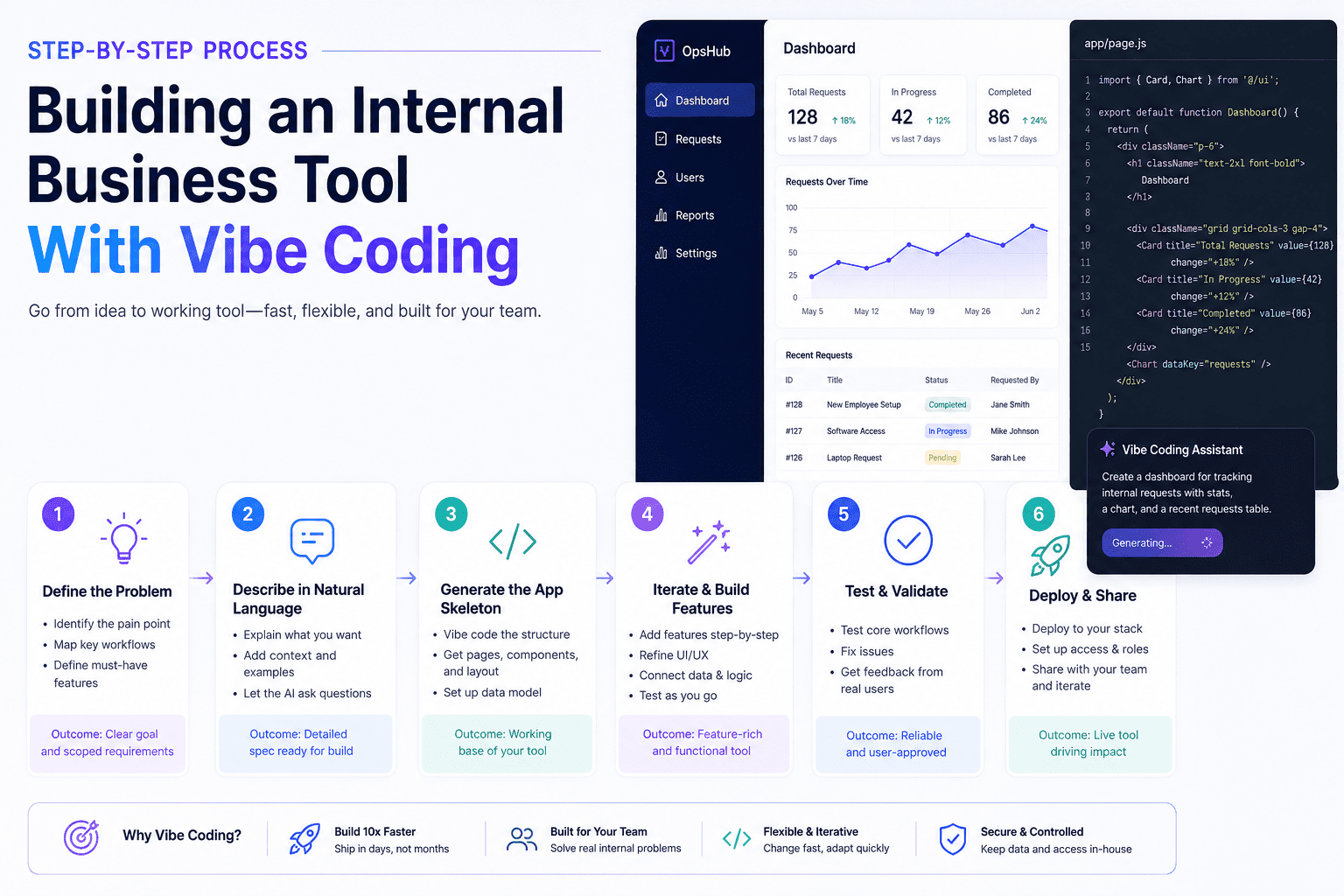
- 3 Step-by-Step Process of Building an Internal Business Tool With Vibe Coding
- 3.1 Start With 20 Minutes of Clarity, Not Code
- 3.2 Pick Your Platform Without Overthinking It
- 3.3 Your Prompt Is Your Blueprint, Write It Like One
- 3.4 Your First Version Will Be Wrong, That’s the Point
- 3.5 Test for the Confused New Hire, Not the Power User
- 3.6 Ten Minutes With Your Team Beats a Hundred Hours of Solo Testing
- 4 Here’s What Actually Worked for Us to Ship a Tool in 4 Days
- 4.1 The setup:
- 4.2 The clarity exercise (25 minutes):
- 4.3 The build:
- 4.4 The surprise:
- 4.5 The result by day four:
- 5 Four Mistakes That Kill Internal Tools Before Anyone Uses Them
- 6 Ready to Build Yours?
Every company has them. The Slack thread that became a process. The Google Sheet with seventeen tabs, which three people pretend to maintain. The form one person built in Excel that the entire team now depends on, and nobody else knows how to fix.
These are internal tools. Bad ones, but tools all the same. They route approvals, track requests, hold customer notes, and manage onboarding. They break in small, constant ways that cost hours every week and never make it onto anyone’s roadmap.
If you run an ops team, manage a department, or you’re the founder still doing things the founder shouldn’t be doing, this is for you. Vibe coding has changed what it costs to fix this. The build that used to take six weeks and a dev sprint now takes a few days and a person who can describe what they want clearly.
What Counts as an Internal Business Tool
An internal business tool is anything your team uses to do its job that customers never see: approval flows, dashboards, request forms, status trackers, simple CRMs, ticket routers. Most teams already have these, held together with spreadsheets and chat messages instead of code. They exist, but they don’t work, and the quiet cost adds up fast.
Types of Internal Tools You Can Build With Vibe Coding
Vibe coding works best for tools that solve one job for a small, defined group. The clearer the job and the smaller the group, the faster you’ll ship.
- Approval workflows: Expense requests, time off, hiring sign-offs, vendor approvals.
- Internal dashboards: Numbers pulled from a few sources into one view that your team actually checks.
- Onboarding portals: New-hire checklists, document collection, and access requests.
- Lightweight CRMs: Tracking leads for a small team that won’t use Salesforce.
- Data entry forms: Replacing the Google Form that feeds the spreadsheet nobody can read.
- Ticket routers: Requests from one department to another, with status and ownership.
- Asset trackers: Equipment, licenses, accounts that get handed around and lost.
If your problem fits one of these, vibe coding will get you most of the way there in days. If it doesn’t, the tool you need is bigger than this article.
Why “We’ll Build That Next Quarter” Never Actually Happens
The Truth About Why Internal Tools Don’t Get Built
Why These Internal Business Tools Never Get Built
Your team identifies the broken process, writes a ticket, and the ticket joins a queue. Engineering looks at it next quarter, decides customer-facing work takes priority, and pushes it. Six months later, you’re still copying data between tabs.
This isn’t a failure of will. It’s math. A developer week costs real money and competes against features customers pay for. A 10-person tool that saves five hours a week will lose that comparison every time, not because the math is wrong, but because the math doesn’t include the cost of doing nothing, which is harder to measure.
Vibe coding skips the negotiation. The person closest to the problem (the ops manager, the team leads, the founder) describes what they need in plain English and gets a working prototype the same day. For teams that need ongoing depth, vibe coding services and dedicated vibe coding developers extend the same approach further, but the starting point is something anyone can do.
Step-by-Step Process of Building an Internal Business Tool With Vibe Coding
Here’s how the process above played out on a real build. The shortcuts we took, the assumption we almost got wrong, and what week one of usage actually looked like.
Start With 20 Minutes of Clarity, Not Code
Before you open any platform, answer four questions in writing.
One: What specifically is broken right now, in concrete terms? Not “our onboarding is messy” but “new hires miss two of seven access setups in their first week, and we find out a month later.”
Two: Who are the actual people who’ll use this? Name them. If you can’t name three, you might be building for an audience that doesn’t exist.
Three: What does success look like in week one? Not the long-term vision, the thing that has to be true seven days after this ship for the build to have been worth it.
Four: What happens if this tool just doesn’t exist? If the honest answer is “things continue, slightly annoyingly,” you may be solving a problem that doesn’t deserve a tool. Useful to know before spending two days building.
Pick Your Platform Without Overthinking It
The decision is simpler than the comparison pages make it look. Ask two questions: who’s building this, and what data does it touch?
| Platform | Best for | Output | Strongest use |
| Cursor | Technical builders | Real codebase | Tools you’ll extend or maintain in code |
| Replit | Semi-technical | Hosted app with code access | Quick deploys, team-facing tools |
| Lovable | Non-technical | Hosted web app | Frontend-heavy prototypes |
| Bolt | Non-technical | Hosted web app | Visual builds, full-stack prototypes |
| v0 by Vercel | Designers, frontend | React components | UI-first tools, dashboards |
| Claude artifacts | Anyone | Inline app | Single-page tools, quick utilities |
If your tool touches customer information, financial records, or anything regulated, pick a platform with proper data controls and a deployment path you can secure. For purely internal coordination data, any of the above will work. Pick one, commit, move. The platform you didn’t pick wouldn’t have changed the outcome much.
Your Prompt Is Your Blueprint, Write It Like One
The biggest predictor of how good your first version will be is how clearly you wrote the prompt. Not how long. How clear.
A good prompt has five parts: the users (who and what role), the problem (what’s broken now), the fields and inputs (what information moves through), the rules (what has to be true, what can never happen, who sees what), and the output (what the tool produces when used correctly).
Vague prompts produce vague tools. “Build me an approval system” gives you a generic. “Build a tool where managers submit hiring requests with role, budget, and start date; HR reviews and either approves, rejects with comment, or sends back for revision; the requester gets notified at each step; HR sees a dashboard of pending requests sorted by age” gives you something you can use Monday morning.
Your First Version Will Be Wrong, That’s the Point
The first build will have things missing, fields wrong, weird flows, and at least one feature you forgot to ask for. Fine. Its job is to be specific enough that you can finally see what’s actually wrong with your idea.
When you get it back, don’t fix everything at once. Triage. Fix what blocks someone from completing the core task. Ignore what’s cosmetically off but functionally fine.
The trap here has a name: Build Drift. You start fixing small issues, each fix invites a new request, the requests pile up, and four days later, you’re building a different tool than you started with. Check every change against the four answers from your clarity exercise. If a change doesn’t serve the original problem, it waits.
Test for the Confused New Hire, Not the Power User
Here’s the test that matters: imagine someone joining your team next Monday, three days in, no context, asked to use this tool to complete a task. Can they do it without asking anyone for help?
Call this the Monday Morning Test. It’s harder than “does it work?” and it’s the only bar that predicts whether your team will actually adopt the tool. Walk through it as that person would. Are the labels obvious? When something goes wrong, does the tool tell them what to do, or just show an error? Fix what you find.
Ten Minutes With Your Team Beats a Hundred Hours of Solo Testing
After your own pass, hand it to two or three people who’ll actually use it. Don’t explain. Don’t demo. Just say “try to do X with this and tell me where you got stuck.”
Ten minutes of this surfaces problems you’d never find alone. They’re not problems with the tool; they’re problems with the assumptions you made about how people think about the task. Your team will hit something obvious to them and invisible to you. That’s the gold.
Here’s What Actually Worked for Us to Ship a Tool in 4 Days
Here’s how the process above played out on a real build. The shortcuts we took, the assumption we almost got wrong, and what week one of usage actually looked like.
The setup:
- Built an internal hiring request tracker in four days
- 23 hiring managers across three departments are using it
- Old process: a shared spreadsheet that ten people edited at the same time
- It had broken twice in the previous month
- People had stopped trusting it, and hiring decisions were happening in DMs
The clarity exercise (25 minutes):
- Our first instinct was to design around the manager’s view: clean form, status page, notifications
- The real problem was on the HR side
- HR couldn’t see all open requests in one place, couldn’t sort by age, and kept missing ones that sat without action for a week.
- One sentence reshaped the build: “I don’t need a new form, I need to know what I haven’t done yet.”
The build:
- The first working version was up in six hours on Replit
- Missing the comments thread because we’d forgotten to include it in the prompt
- Added it in twenty minutes
The surprise:
- Managers wanted to see each other’s open requests, not hide them
- We’d assumed they’d want privacy
- Visibility into the queue stopped them from double-asking HR for status
- That had been a quiet source of friction nobody had named
The result by day four:
- 23 people are using it daily
- The spreadsheet got archived
- Total person-hours spent building: about 11
- Replaced a process that had been costing roughly four hours a week of coordination across the team
Four Mistakes That Kill Internal Tools Before Anyone Uses Them
These are the four ways teams quietly waste the speed advantage vibe coding gives them. None of them is technical. All of them are avoidable.
- Building for everyone instead of the actual three users: The fastest way to ruin a small tool is to design it for a hypothetical large audience. Name the three real people who’ll use it on day one. Build for them.
- Treating the first version as the final version: First versions exist to learn from. Teams that ship and walk away end up with tools that almost work, get abandoned in six weeks, and become the next thing someone has to clean up.
- Skipping the handoff conversation: Two months later, someone needs to change a field, and nobody remembers how. Decide on day one who owns this tool, where the build lives, who can change it, and what happens when the builder leaves.
- Building to spec instead of building to use: Specs are easy to write, hard to verify. Real use is hard to predict, easy to verify. The team that gets the tool into someone’s hands on day two and fixes what they actually stumbled on will ship something good. The team that writes a thirty-page spec will ship something correct that nobody uses.
Ready to Build Yours?
The broken process you’ve been tolerating has a cost. You probably can’t name it, but you can feel it in the Slack questions that keep repeating, the spreadsheet that keeps breaking, the things that fall through the gap between two people’s responsibilities. None of it shows up on a quarterly report, and all of it is real.
Vibe coding doesn’t fix everything. Some tools are too important, too complex, or too connected to other systems for a few-day build. Those deserve real engineering. But the long tail of small internal tools, the ones waiting in the backlog forever, can be solved this week by someone on your team willing to spend twenty minutes getting clear and a couple of afternoons building.
If you’re past the prototype stage and need experienced vibe coding developers to extend, harden, or scale what your team has started, hire vibe coding developers who’ve shipped these tools at production scale.
Start with the smallest tool. Ship it. Then ship the next one.