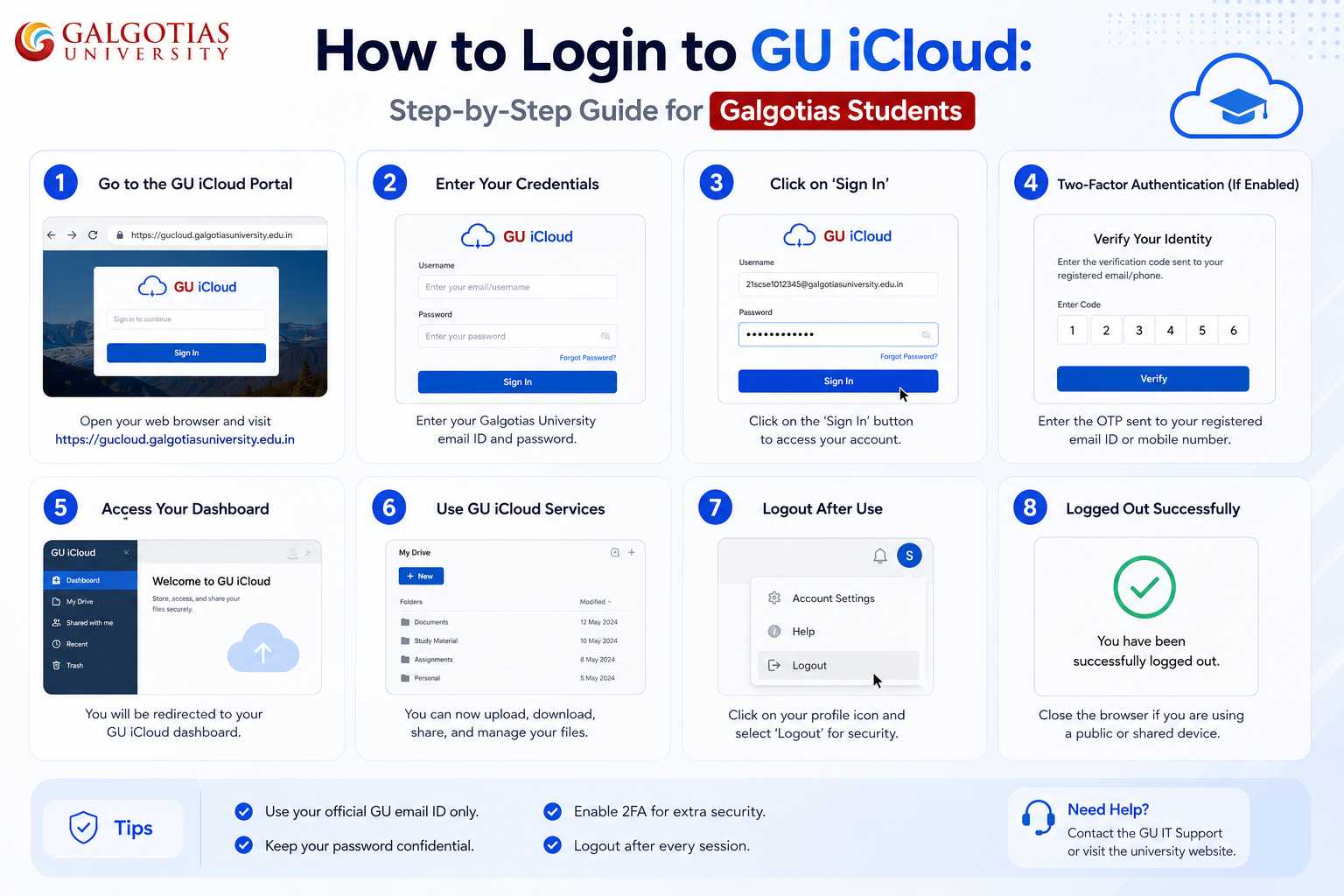
How to Login to GU iCloud: Step-by-Step Guide for Galgotias Students
Imagine you are a newly admitted student at Galgotias University, and someone has just given you a PDF with your login credentials. Then, you end up staring at the phrase “GU iCloud” and wondering what exactly you will be able to do with it. Such confusion is pretty common. Most students spend their initial weeks asking seniors for the correct link, while the reality is that one should not waste time and simply log in and use the thing.
Allow me to explain in detail what it is, how to log in, and what to do when things go wrong.
What Is GU iCloud, Really?
GU iCloud is the official learning and academic management point for students at Galgotias University. The whole name is Galgotias University iCloudEMS, and it is based on a platform made by ESDS Software Solution Pvt. Ltd. The latter is a company that designs education management software for universities in India.
You may call it your online base for your university life. Marks, attendance, schedules, assignments, fee receipts, and hall tickets are all stored here. One login, one place.
It would be nice to clarify that GU iCloud has no relation at all to Apple’s iCloud. The name is just a coincidence. If you were searching for your iPhone backup, this is not the right place. It is exclusively a Galgotias system.
How to Log In to GU iCloud (Step by Step)
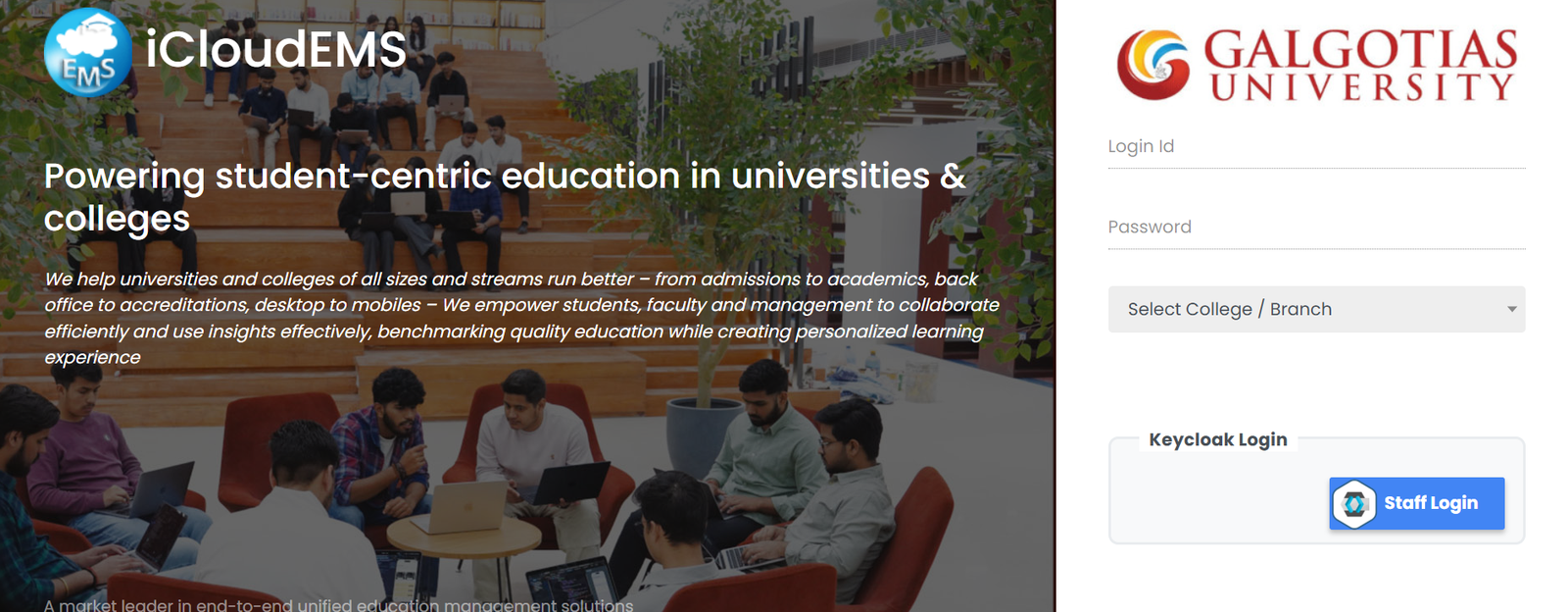
The official portal address is gu.icloudems.com. Save it now because most of the students’ problems arise from clicking randomly shared links in WhatsApp groups that either expire or open the wrong page.
This is the way to access:
- Launch a browser; Chrome, Edge, and Firefox are the top browsers that work best with the portal.
- Navigate to gu.icloudems.com or the shortcut gu.icloudems.com/corecampus/index.php
- Choose your role: student, faculty, or staff
- Type your enrollment number or university-issued user ID
- Input your password
- Click Login, and your personal dashboard will be displayed right away
You get your login details from the university. If you are a new student, these are normally given to you in the admission PDF or through the academic office of your department. If you have not got them, do not wait, but get in touch with the IT helpdesk.
What You’ll See on Your Dashboard
Once inside, the dashboard is organized by role. For a student, the key features you would mostly interact with are:
- Attendance: This shows your attendance percentage for each class, which the teachers update
- Timetable: a weekly schedule showing venues and course codes
- Results & Marks: a live record of your internal assessments and end-of-semester results
- Assignments: You can upload your assignments and get the teacher’s comments
- Fee Management: check your dues, payment record, and download receipts
- Admit Cards: You can print these just before exams (conditions apply)
- Announcements: messages from different departments, the academic office, and the administration
It may appear quite confusing at first sight. The secret is to simply disregard all that you don’t require right now and only keep in mind attendance and timetable as your main focus during your first month. Gradually, other things will start to have meaning as the semester progresses.
Features Worth Knowing About
GU iCloud isn’t merely a fancy bulletin board. Some functionalities, after you discover them, will simplify your student life significantly. Here are a few:
Study Materials: Instructors sometimes upload lecture notes, slides, and textbooks directly to the portal. This means that the old days of begging for PDF files before exams are finally over.
LMS Integration: GU iCloud is linked to the university’s Learning Management System. Therefore, some courses conduct tests and examinations through this channel only. So, do check out your course-specific sections thoroughly.
Mobile Access: You can access the portal using any mobile browser without downloading an app. However, if you like the idea of having a separate app, the official iCloudEMS app is available on Android and iOS platforms.
Feedback and Complaints: A grievance system is part of the package. Through the portal alone, students can raise problems or forward feedback without having to separately send emails to anyone.
Common Problems and How to Fix Them
This is the section most articles skip, which is frustrating because login issues are the number one reason students go searching for help.
Wrong credentials — the most common mistake is entering your email address when the portal needs your enrollment number. Double-check the format before assuming your password is wrong.
Forgot password — go to the login page, click “Forgot Password,” enter your username, complete the captcha, select your college/branch, and submit. A reset link goes to your registered university email.
Portal loading slowly — this almost always happens during peak hours, especially right before assignment deadlines or exam registration windows. Try logging in early in the morning or late at night when traffic drops.
Admit card not showing — this one trips a lot of students. Your admit card won’t appear until two conditions are met: fees are cleared and the semester feedback form is submitted. Once both are done, it shows up automatically.
Page not opening at all — clear your browser cache, update the browser, and try again. If the issue continues across different browsers, the portal may be under maintenance. Check with your department.
Also Read- Skywork AI Surprised Me. It Also Frustrated Me. Here’s Both Sides
GU iCloud vs Apple iCloud
| Feature | GU iCloud | Apple iCloud |
| Purpose | The university’s academic portal is used by students and staff | Personal cloud storage and syncing service |
| Managed By | Galgotias University IT Department | Apple |
| Access | Requires university-provided login credentials | Accessible through personal Apple ID |
| Main Use | Attendance, assignments, student records, notices, and academic resources | Storing photos, backups, files, contacts, and device data |
| Who Can Use It | Only authorized university users | Anyone with an Apple account |
| Device Connection | Not tied to personal devices | Deeply connected with iPhone, iPad, and Mac devices |
| Similarity | Shares the word “iCloud” in the name only | Official Apple cloud ecosystem |
| Relationship Between Them | No connection with Apple services at all | Completely separate from GU iCloud |
Quick Tips to Actually Get Value From It
- Make gu.icloudems.com your favorite site and remove all the unofficial links you might have saved.
- Keep checking your dashboard at least five times a week, not just when exam time is near.
- In order to avoid confusion due to schedule changes, download your timetable at the beginning of each semester.
- Don’t wait till the last minute to submit the feedback form, for sure, you will need to have it cleared when the admit cards are released.
- If you are using a shared or a public device, always remember to log out after every session.
Final Verdict
GU iCloud is undoubtedly one of the most handy tools that a student of Galgotias University can use for their academics. After the initial struggle with logging in, the platform makes your life easier in various ways. You can easily check your attendance and also download your exam admit cards without any hassle.
Besides that, there are times when the page takes time to load, and the session expires; These are very common issues and not really a big deal. In essence, GU iCloud is a centralized academic management system that delivers on its promises. You’d better save the link to the official portal gu.icloudems.com, remember your login details, and keep looking at your dashboard from time to time. Basically, a Galgotias student using GU iCloud regularly is a must.
FAQs
What is GU iCloud?
GU iCloud is the official digital academic portal of Galgotias University, used to manage attendance, results, assignments, timetables, fees, and university communications.
What is the GU iCloud login URL?
The official URL is gu.icloudems.com.
Can I access GU iCloud on my phone?
Yes. It works on any mobile browser, and there’s also a dedicated app called iCloudEMSV2 available on both Android and iOS.
Is GU iCloud connected to Apple iCloud?
No. The two are completely unrelated.
Who do I contact if my login isn’t working?
Reach out to the Galgotias University IT department or your academic office with your enrollment number ready.