
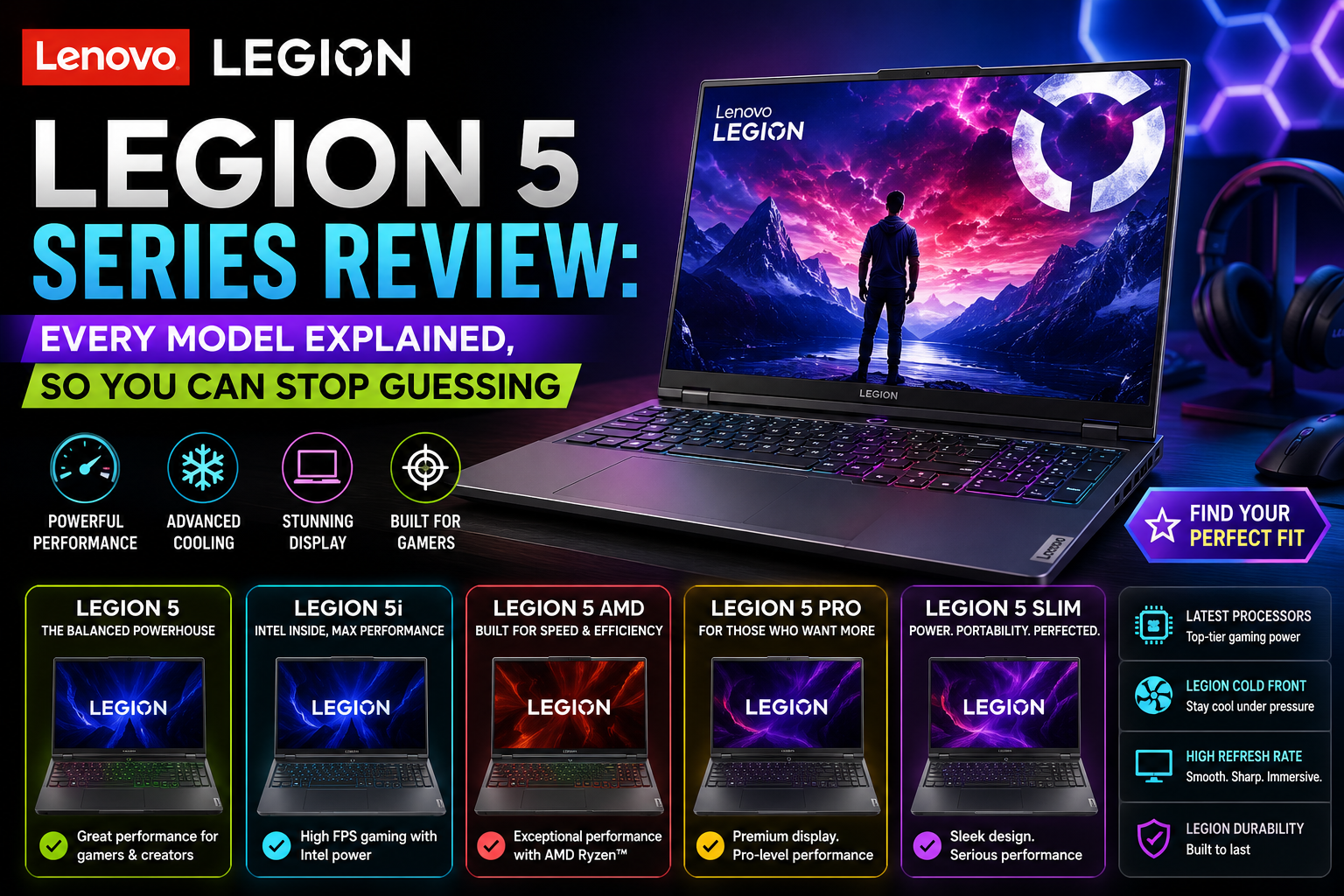
Lenovo Legion 5 Series Review: Every Model Explained, So You Can Stop Guessing
- 1 What Is the Lenovo Legion 5 Series?
- 2 The Full Series Breakdown
- 2.1 Lenovo Legion 5 (AMD)
- 2.2 Lenovo Legion 5i (Intel)
- 2.3 Lenovo Legion 5 Pro
- 2.4 Lenovo Legion 5 Gen 8 / Gen 9 / Gen 10
- 2.5 Lenovo Legion Pro 5 / Pro 5i
- 2.6 AMD vs Intel: The Decision Most Buyers Get Wrong
- 2.6.1 Choose AMD if:
- 2.6.2 Choose Intel if:
- 2.7 Display: IPS vs OLED
- 2.8 How It Competes: Legion 5 vs. the Field
- 2.9 Who Should Actually Buy the Legion 5?
- 3 Final Verdict
After reading lots of gaming laptop specification sheets, review threads, and buyer forums, one thing is still true: people are really puzzled by the Lenovo Legion 5 series. And to be fair, the Lady Lenovo Legion 5 series is so vast and has so many different types of machines that the confusion is pretty understandable.
It’s not one laptop; it is a whole range of machines with different names, chipsets, screens, and buyers in mind. Legion 5, Legion 5i, Legion 5 Pro, Legion 5i Pro, Legion 5 Gen 9, Legion 5 Gen 10. These are not just random tags. Each one stands for something very specific.
This guide helps you to understand the new world of the Legion 5 series.
What Is the Lenovo Legion 5 Series?
Lenovo’s Legion 5 is a mid-tier gaming laptop line from Lenovo, positioned between the very affordable LOQ series and the high-end Legion Pro 7. It has been there for years, a constant sweet spot in gaming laptops, powerful enough for gaming at a serious level, yet reasonably priced so that the majority of buyers can afford it.
It is for two main groups of people that the series is designed. One, gamers who want solid performance but do not want to pay flagship prices. Two, students and professionals who want a versatile laptop that can also be used for demanding creative or technical work. Legion 5 has always been very good at meeting the needs of such users and is better than most of the competition in that price range.
The Full Series Breakdown
Most guides just gloss over this part, but here’s a full rundown of all the Legion 5 variants and their differences.
Lenovo Legion 5 (AMD)
This is the main version. It features AMD Ryzen CPUs. It is generally recognized for using less power and running cooler for longer. 15-inch versions are available. The Gen 10 (2025) lineup offers AMD Ryzen 7 250, Ryzen 7 260, and Ryzen AI 7 350 paired with RTX 5050 to RTX 5070 Laptop GPUs.
Lenovo Legion 5i (Intel)
Intel is always indicated by “i”. It shares the same chassis and similar features with the AMD model, but is powered by Intel Core processors. Gen 9 introduced the Core i9-14900HX. Gen 10 adopted Intel Core Ultra HX architecture. Allows Thunderbolt, which the AMD version doesn’t have.
Lenovo Legion 5 Pro
The 5 Pro is the AMD-based, larger-screen model. It upgrades to a 16-inch 2560×1600 display with a 16:10 aspect ratio. It has a higher resolution, more area for work, and the ability to enjoy entertainment together, which also makes it a better choice for content creation besides gaming.
Lenovo Legion 5i Pro: The 5i Pro is the Intel counterpart of the Pro. Besides sharing the larger screen, 5i also has the Thunderbolt feature, performance-wise, based on Intel.
Lenovo Legion 5 Gen 8 / Gen 9 / Gen 10
These generation terms mainly indicate a yearly release cycle. Gen 9 (2024) models were equipped with 14th-gen Intel and RTX 40-series graphics. Gen 10 (2025) models brought RTX 50-series GPUs, optional OLED panels, Wi-Fi 7, as well as the significant redesign of the chassis that allowed the 15-inch version to become lighter and more compact than earlier generations.
Lenovo Legion Pro 5 / Pro 5i
These are somewhat more advanced than the ordinary Legion 5 and are positioned right below Legion Pro 7 in Lenovo’s line-up. Pro 5i Gen 10 can be equipped with up to RTX 5070 Ti graphics, Intel Arrow Lake HX processors, a 240Hz OLED panel, and ColdFront cooling that supports 200W of crossload power.
AMD vs Intel: The Decision Most Buyers Get Wrong
This is the one thing that happens most frequently with the Legion 5 series. People have a preference for one over the other due to brand loyalty or a general impression. The real difference is.
Choose AMD if:
- You want to pay attention to battery life. Compared with the Intel version, the AMD Gen 10 has a much longer battery life on a single charge, but consumes considerably less power in regular use thanks to the battery’s 80Wh capacity.
- Perform long, GPU-intensive tasks. AMD variants are known to provide more consistent power delivery from the GPUs over long gaming sessions without thermal throttling.
- No Thunderbolt! Most of the models in the Legion 5 series of the AMD family opt for USB4 instead, which can work with external monitors but is not fully compatible with the AMD Thunderbolt dock system.
Choose Intel if:
- The main thing you are interested in is raw CPU performance. The Intel Core Ultra HX chips offer an edge in audio-visual and simulation workloads and in multi-core applications, such as video rendering and compilation, among others.
- You currently use a Thunderbolt dock or plan to do so in the future. The Legion 5i is natively supported by Thunderbolt, while the AMD one is not.
- You use creative software that takes up a lot of computer resources in addition to games. Intel’s potential with only processing tasks is measurably greater.
- There is no right/wrong response. Ultimately, it depends on what you need to do. Gamers who commute or do battery work as well.Gamers who commute or work on a battery as well. Power users chained to a desk — Intel.
Display: IPS vs OLED
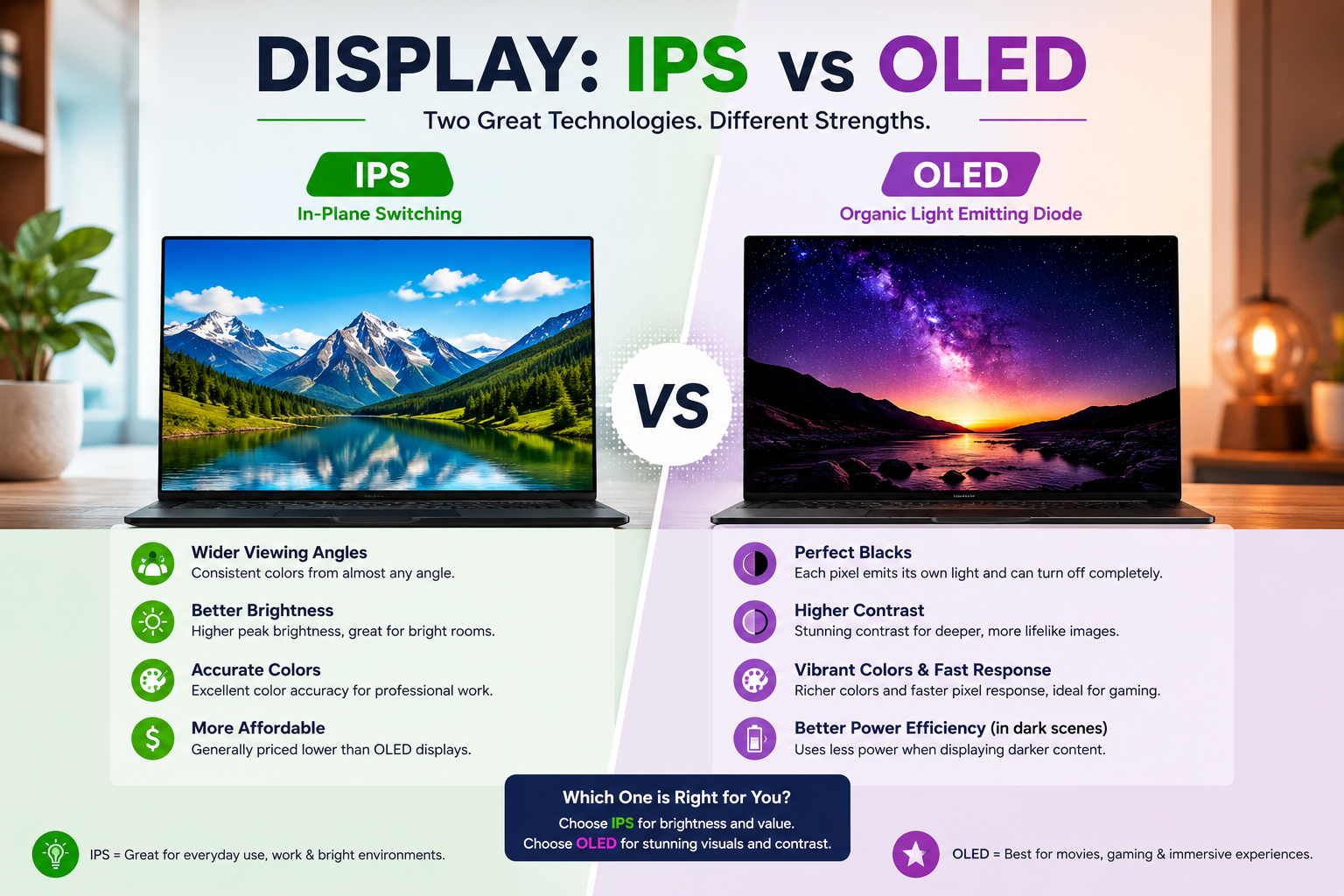
Initially, one might mistake the Legion 5 Gen 10 for 2025 as merely having an OLED update, but this new feature totally changes the topic of the product.
It’s not just a good-looking screen for the model with the OLED display. If you look closely, the variant with the OLED screen appears smaller and lighter physically than the IPS one. The secret behind the 15.1-inch panel at only 1.94 kg is the OLED, while the IPS version is 15.3 inches and weighs nearly 200 grams more. The OLED variant is also thinner by a significant margin.
While gaming and doing content, the OLED gives visually superior contrast and more accurate colours, especially in darker scenes. Its disadvantage is a mirror-like surface that reflects surrounding light and, of course, the well-known semipermanent burn-in risk of the OLED. For a laptop that is mainly used indoors, the OLED is a wise choice. Those who game in brightly lit rooms or outside will find the IPS to still be pretty good.
How It Competes: Legion 5 vs. the Field
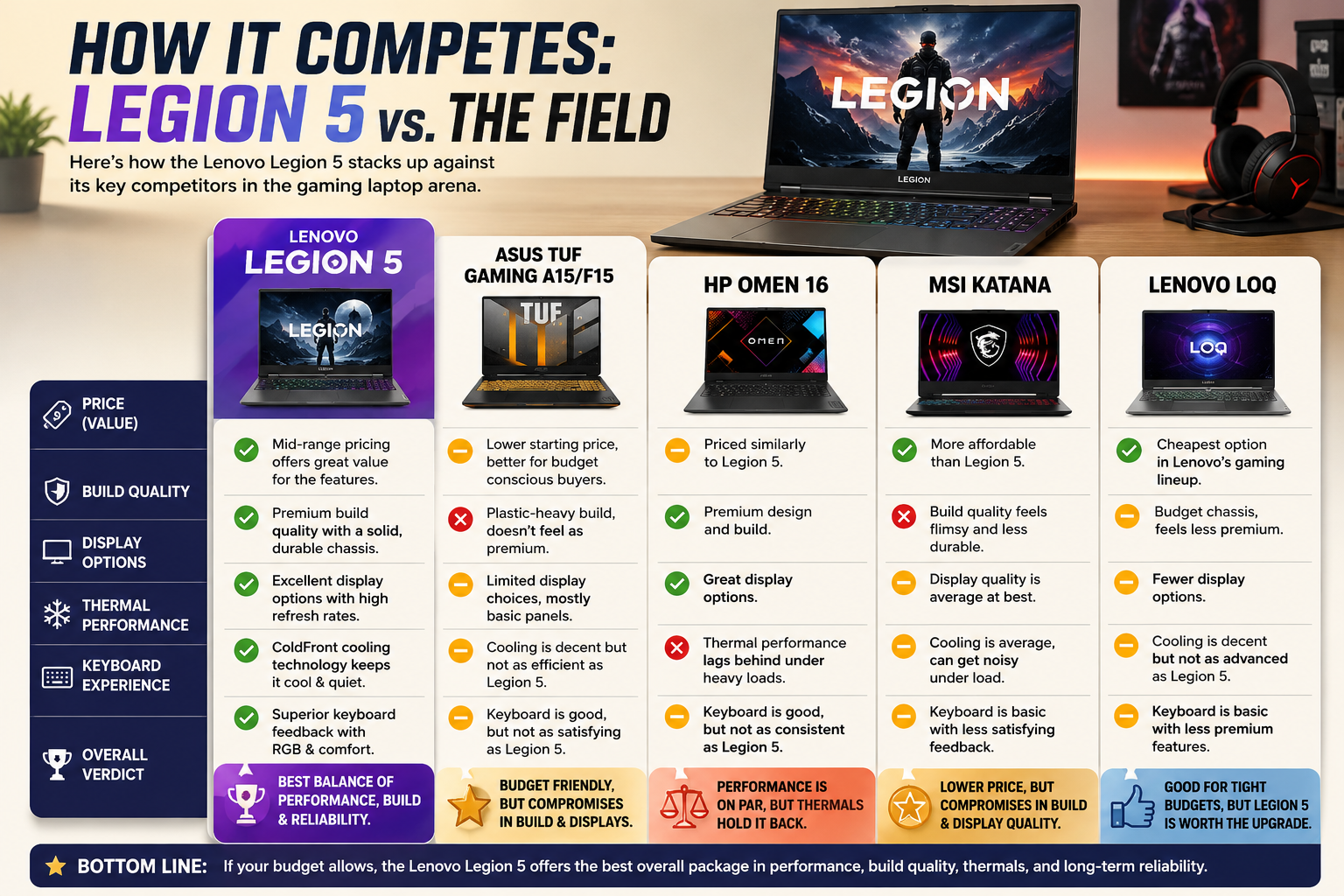
People who are thinking about buying a Legion 5 and are also looking at other options will most likely consider four competitors. Here’s how the Legion 5 compares, to be honest.
- ASUS TUF Gaming A15/F15: The TUF is less expensive at the basic level but lacks built-in quality, and there are not many options for the display. Legion 5 is better in terms of keyboard feedback and cooling performance.
- HP Omen 16, Performance-wise: the two are on par, but the Omen has been less efficient in thermal management, especially under heavy load. Legion 5, with its ColdFront cooling technology, is more dependable for extended usage.
- MSI Katana: The Katana has a lower price, but it compromises on build strength and display quality. If you are going to use the computer seriously, the Legion 5 is the better choice for a long-term investment.
- Lenovo LOQ: This is Lenovo’s lowest-tier gaming series. The LOQ is cheaper, but you are stuck with older-generation GPU configurations, and it also has a less premium chassis. If your budget can handle the Legion 5, then it is totally worth it.
Who Should Actually Buy the Legion 5?
Purchase the Legion 5 (AMD) if you desire a setup of balanced everyday performance, longer battery life, and good gaming in a 15-inch body at a very affordable price point.
Get the Legion 5i (Intel) if you really want to get the most out of the CPU and have Thunderbolt support and don’t mind some battery inefficiency.
Choose Legion 5 Pro or 5i Pro if you are after a larger 16:10 screen, a sharper image, and more freedom for GPU-intensive creative areas.
If you want a device under 2 kg for serious portability, look elsewhere; the Legion 5 series was not made to fulfill such desires. The Legion Slim line is more suitable for that purpose.
Final Verdict
The Lenovo Legion 5 series is famous because it really focuses on what counts. Each generation comes with high build quality, great keyboards, good cooling, and a great performance-value ratio.
This year’s 2025 Gen 10 update brings OLED displays, RTX 50-series GPUs, and a lighter body, making the entire line-up even more attractive. If you are looking for a versatile companion for everyday use, then the AMD models are the go-to choice. Intel models, on the other hand, are geared towards power users and productivity tasks. However, there is really no wrong choice. The key thing is figuring out which configuration fits your lifestyle and different needs, and by now, you have that knowledge.
FAQs
What differentiates Legion 5 and Legion 5i?
Legion 5 is built around AMD Ryzen processors, which provide longer battery life and better thermal efficiency.
Legion 5i comes with Intel processors, which are capable of delivering higher raw CPU performance and offer Thunderbolt connectivity. Both have similar chassis designs and GPU configurations.
Can the Lenovo Legion 5 be used for daily tasks apart from gaming?
Definitely. Legion 5 is very capable of handling productivity, content creation, and other everyday computing tasks. Particularly, the AMD model is power-efficient enough to be used for working on the go without the need for a power outlet, so it’s truly a dual-purpose machine.
Which Legion 5 is the best option for a beginner in 2025?
The Legion 5 Gen 10 featuring AMD Ryzen 7 and RTX 5060 Laptop GPU is the best overall option as a starter, enchanted for modern gaming, at ease for daily use, and reasonably priced without paying too much for features that most people won’t need.
Is there an OLED display option for the Lenovo Legion 5?
Indeed, beginning from Gen 10 (2025). The OLED version features a 15.1-inch 165Hz screen that shows outstanding contrast and color accuracy. Additionally, it is more compact and lighter in weight than the typical IPS setting.















