
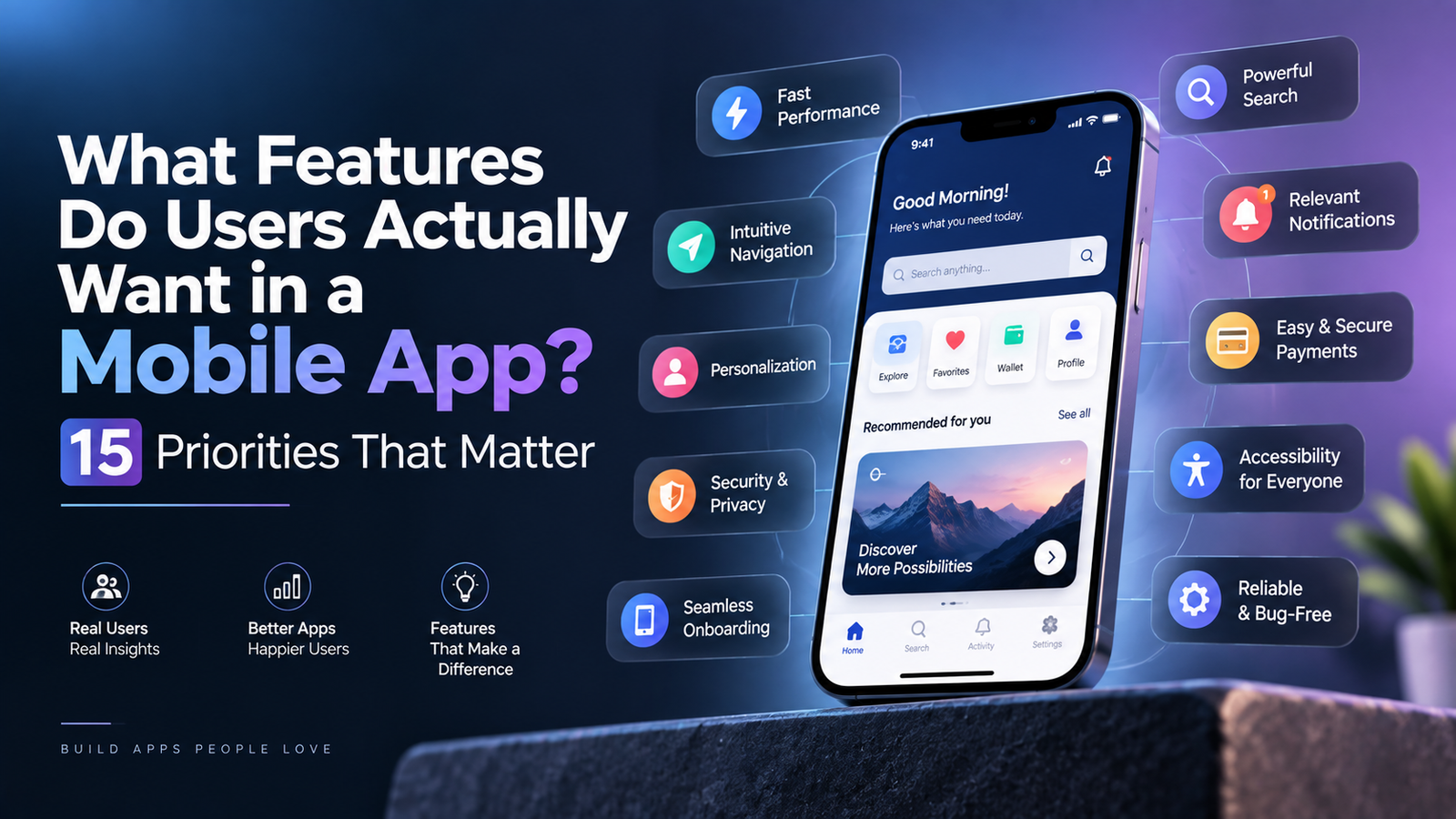
What Features Do Users Actually Want in a Mobile App? 15 Priorities That Matter
- 1 Key Takeaways
- 2 What Counts as a Mobile App Feature?
- 3 Start With the Core User Journey, Not a Feature Checklist
- 4 15 Mobile App Features and Qualities Users Value
- 4.1 1. A Clear, Focused Core Experience
- 4.2 2. Simple, Progressive Onboarding
- 4.3 3. Fast Startup and Responsive Interactions
- 4.4 4. Predictable Navigation and Effective Search
- 4.5 5. Accessibility From the First Release
- 4.6 6. Secure, Low-Friction Authentication
- 4.7 7. Transparent Privacy and User Control
- 4.8 8. Useful Error Messages and Recovery
- 4.9 9. Offline and Weak-Network Resilience
- 4.10 10. User-Controlled Notifications
- 4.11 11. Personalization With an Explanation and Escape Route
- 4.12 12. Frictionless Forms, Checkout, and Payments
- 4.13 13. Status Tracking and Timely Feedback
- 4.14 14. In-App Support and Self-Service
- 4.15 15. Analytics, Monitoring, and Feedback
- 5 Which Features Depend on the App Category?
- 6 Features That Are Valuable Only When the Use Case Justifies Them
- 7 How to Prioritize Mobile App Features
- 8 How Should Teams Validate a Feature Before Building It?
- 9 How Do You Measure Whether a Mobile App Feature Works?
- 10 Common Mobile App Feature-Planning Mistakes
- 10.1 Treating Every Competitor Feature as Mandatory
- 10.2 Confusing Novelty With User Value
- 10.3 Overloading the MVP
- 10.4 Using Notifications as a Substitute for Product Value
- 10.5 Designing Only for Ideal Connectivity
- 10.6 Ignoring Failure and Recovery States
- 10.7 Shipping Without Accessibility Testing
- 10.8 Launching Features Without Ownership
- 11 Mobile App Feature Checklist
- 11.1 Core Journey
- 11.2 Experience and Accessibility
- 11.3 Performance and Reliability
- 11.4 Security and Privacy
- 11.5 Connectivity
- 11.6 Engagement
- 11.7 Operations
- 12 Frequently Asked Questions
- 12.1 What features should every mobile app have?
- 12.2 Which mobile app feature matters most?
- 12.3 How many features should a mobile app MVP include?
- 12.4 Are push notifications essential for every app?
- 12.5 Should every mobile app work offline?
- 12.6 When is mobile app personalization worth implementing?
- 12.7 What security features should a mobile app include?
- 12.8 Should a mobile app include an AI assistant?
- 12.9 How should teams prioritize mobile app features?
- 12.10 How can a team tell whether a feature is successful?
- 13 Final Takeaway
Users rarely judge an app by the number of features it contains. They judge whether it helps them complete an important task quickly, safely, and without confusion.
Whether a business builds internally or works with a mobile app development company in the USA, feature selection should begin with user evidence rather than a generic checklist. Performance, accessibility, privacy, and reliability are broadly important, while capabilities such as live streaming, loyalty programs, augmented reality, and AI assistants only make sense when they solve a verified problem.
This guide explains the mobile app features users value, how those requirements change by product category, and how teams can prioritize features without creating an overloaded application.
Key Takeaways
- Users value successful task completion more than a large feature set.
- Performance, security, accessibility, reliability, and privacy are foundational product qualities.
- Search, checkout, tracking, messaging, and offline access depend on the app’s primary workflow.
- Push notifications and personalization need relevance, consent, and user controls.
- AI, augmented reality, gamification, and live video are optional, not universal requirements.
- Every proposed feature should have supporting evidence, a responsible owner, and a success metric.
- An MVP should deliver one complete user journey rather than several unfinished ones.
What Counts as a Mobile App Feature?
A mobile app feature is usually understood as something a user can access or perform, such as searching, booking, paying, messaging, or tracking an order. However, successful applications also depend on qualities that users may not see directly.
These requirements can be divided into four groups:
| Type | Examples | Value to the user |
| Core function | Booking, checkout, messaging, navigation | Completes the app’s primary task |
| Experience quality | Speed, accessibility, reliability | Makes the task usable and dependable |
| Enabling capability | Search, notifications, offline mode | Reduces effort or uncertainty |
| Operational capability | Analytics, monitoring, support tools | Maintains product quality after release |
Security, for example, is not a single screen that can be added before launch. It affects authentication, data storage, API communication, permissions, session management, dependencies, and account recovery.
For that reason, product teams should evaluate both visible features and the underlying qualities required to make those features trustworthy.
Start With the Core User Journey, Not a Feature Checklist
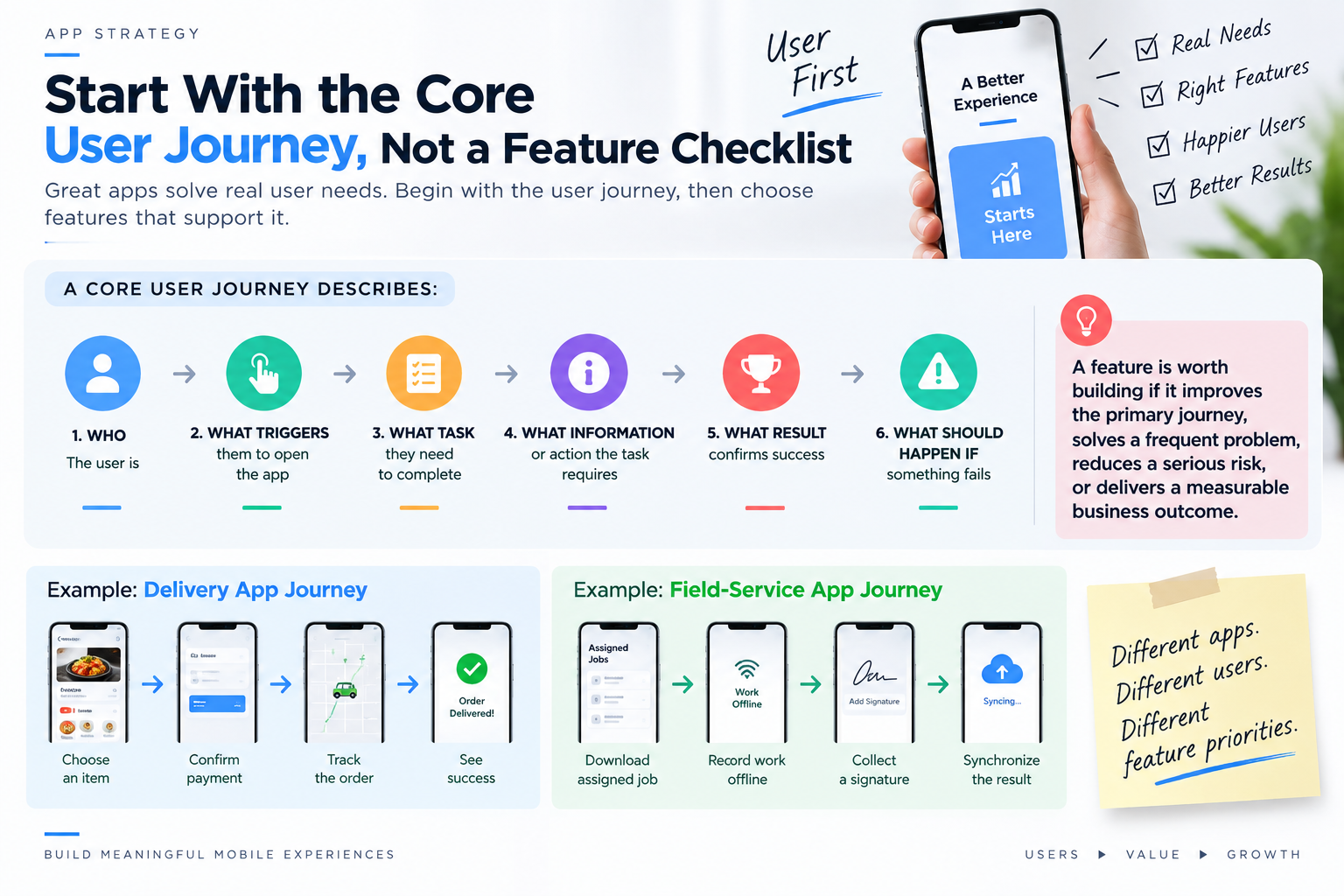
Before creating a mobile app feature list, define the primary user journey.
A core journey describes:
- Who the user is
- What triggers them to open the app
- What task they need to complete
- What information or action the task requires
- What result confirms success
- What should happen if something fails
For a delivery app, the journey may run from choosing an item to confirming payment and tracking the order. For a field-service app, it may involve downloading an assigned job, recording work without connectivity, collecting a signature, and synchronizing the result.
These applications should not have identical feature priorities.
A proposed feature deserves early investment when it improves the primary journey, addresses a frequent user problem, reduces a serious risk, or produces a measurable business outcome. Copying a competitor’s feature without understanding its purpose usually increases complexity without creating comparable value.
15 Mobile App Features and Qualities Users Value
1. A Clear, Focused Core Experience
A useful app communicates its purpose quickly. Users should understand what they can accomplish and what action to take next without navigating through promotional screens or unnecessary options.
The interface should prioritize the main task while placing secondary actions where they remain available but do not compete for attention.
For example, a banking app should make checking a balance, reviewing transactions, and transferring money more prominent than promotional content. A healthcare app should make upcoming appointments and required actions easy to find.
Measure: Primary-task completion rate, time to first value, abandonment rate, and repeated navigation errors.
2. Simple, Progressive Onboarding
Onboarding should help users reach value not delay it.
Avoid requesting every profile field, preference, and permission during the first session. Ask only for information needed to complete the immediate task. Additional details can be collected when they become relevant.
Where appropriate, let users explore before creating an account. If access to location, notifications, photos, or contacts is needed, explain the benefit immediately before presenting the system permission request.
Measure: Onboarding completion, account-creation abandonment, permission acceptance, and activation rate.
3. Fast Startup and Responsive Interactions
Performance is part of the user experience. A visually polished app still feels unreliable when it starts slowly, freezes during common actions, or leaves users waiting without feedback.
Teams should monitor:
- Application startup
- Screen-rendering performance
- API response time
- Image and media loading
- Memory consumption
- Crashes and application-not-responding events
- Performance on older supported devices
If an operation cannot finish immediately, the app should show progress and prevent accidental duplicate actions.
Google’s technical-quality guidance treats stability, responsiveness, rendering, and resource use as fundamental parts of Android app quality.
Measure: Startup time, interaction latency, crash-free users, frozen sessions, and abandonment during loading.
4. Predictable Navigation and Effective Search
Navigation should reflect the user’s mental model rather than the internal structure of the business.
Use familiar platform patterns, descriptive labels, consistent back behavior, and a clear information hierarchy. Users should not need to remember where a function was located or repeat previous steps after opening another screen.
Search becomes important when users need to explore a large catalog, document library, message history, or dataset. Depending on the product, this may require:
- Filters
- Sorting
- Autocomplete
- Recent searches
- Saved searches
- Typo tolerance
- Clear zero-result guidance
Measure: Search-success rate, zero-result rate, filter usage, time to find content, and navigation-related abandonment.
5. Accessibility From the First Release
Accessibility allows more people to use the product and often improves usability for everyone.
Important considerations include:
- Screen-reader labels
- Logical focus order
- Sufficient color contrast
- Text resizing
- Non-color status indicators
- Accessible touch targets
- Alternatives to gesture-only interactions
- Captions and transcripts for media
- Support for different orientations and screen sizes
Accessibility should be tested on critical journeys rather than evaluated only through an automated scan.
The W3C mobile accessibility guidance explains how established accessibility principles apply to native, hybrid, and mobile web experiences.
Measure: Completion of core tasks with assistive technologies, accessibility audit results, and reported accessibility barriers.
6. Secure, Low-Friction Authentication
Authentication should protect the account without creating unnecessary obstacles for legitimate users.
Depending on the product’s risk level, useful capabilities may include:
- Password-manager support
- Passkeys
- Biometric re-entry
- Multi-factor authentication
- Secure account recovery
- Session management
- Additional verification for sensitive actions
Authentication confirms identity, while authorization determines what that identity is allowed to access. Both must be designed correctly. A logged-in user should never gain access to another user’s records simply by changing an identifier in a request.
The OWASP Mobile Application Security Verification Standard provides structured controls for authentication, storage, network communication, platform interaction, privacy, and application resilience.
Measure: Login success, account-recovery completion, authentication abandonment, blocked suspicious activity, and unauthorized-access incidents.
7. Transparent Privacy and User Control
Users should be able to understand what information the app collects, why it is needed, and how it is used.
Privacy-conscious mobile app functionality includes:
- Collecting only necessary information
- Requesting permissions in context
- Providing clear consent choices
- Allowing preferences to be changed
- Supporting data or account deletion when required
- Reviewing third-party SDK behavior
- Avoiding sensitive information in logs and notifications
Application owners remain responsible for data collected through integrated analytics, advertising, payment, customer-support, and marketing SDKs.
Apple requires developers to disclose data practices for their own code and integrated third-party code through App Privacy Details. Google Play has comparable disclosure requirements through its Data safety section.
Measure: Permission acceptance, consent withdrawal, deletion-request completion, privacy-related support requests, and unexpected data collection.
8. Useful Error Messages and Recovery
An error message should explain what happened, what the user can do, and whether their previous action or data was preserved.
“Something went wrong” provides no meaningful direction. A better message might explain that the connection was interrupted, the payment was not completed, and the user can safely retry without being charged twice.
Good recovery design includes:
- Preserving entered information
- Offering retry, edit, cancel, or support actions
- Handling expired sessions
- Preventing duplicate submissions
- Explaining validation problems beside the affected field
- Restoring state after interruptions
Failure paths should be designed alongside successful paths not after testing uncovers them.
Measure: Retry success, repeated errors, abandoned forms, duplicate submissions, and error-related support contacts.
9. Offline and Weak-Network Resilience
Not every application needs full offline functionality, but every mobile app should define what happens when the network becomes slow, intermittent, or unavailable.
Possible strategies include:
- Caching recently used information
- Allowing read-only access to important records
- Saving drafts locally
- Queuing safe operations for later synchronization
- Showing pending and failed synchronization states
- Retrying with appropriate limits
- Resolving conflicting updates
Offline support is especially valuable for travel, logistics, field service, healthcare, productivity, and applications used in areas with unreliable connectivity.
Google’s offline-first architecture guidance recommends allowing users to complete critical tasks without depending on a constant network connection.
Measure: Offline task completion, synchronization failure, unresolved conflicts, retry success, and data-loss incidents.
10. User-Controlled Notifications
Notifications are useful when they communicate timely information that helps the user act. They become disruptive when they are repetitive, irrelevant, or difficult to disable.
Good notification design should:
- Ask for permission after demonstrating value
- Separate transactional and promotional messages
- Provide granular preferences
- Respect frequency and quiet-time choices
- Avoid exposing sensitive information
- Deep-link to the relevant screen
- Prevent duplicate alerts
An order-status update or security warning may be essential. A generic message intended only to increase app opens usually provides less value.
Apple’s notification guidance recommends concise, high-value notifications that respect user control and privacy.
Measure: Opt-in rate, notification-open rate, action completion, disabled notification categories, and app unin
stall trends following campaigns.
11. Personalization With an Explanation and Escape Route
Personalization is valuable when it reduces effort or helps users find relevant information. It should not make the app feel unpredictable or intrusive.
Start with explicit choices, saved preferences, selected interests, preferred locations, or favorites before relying on inferred behavior.
Users should be able to:
- Understand why something was recommended
- Correct an inaccurate preference
- Hide irrelevant suggestions
- Reset recommendation data
- Use the app without unnecessary profiling
More personalization is not automatically better. Its value depends on data quality, user consent, and whether it materially improves the journey.
Measure: Recommendation selection, dismissals, preference changes, repeated use, and opt-out behavior.
12. Frictionless Forms, Checkout, and Payments
Forms should ask only for information required to complete the task.
Useful improvements include:
- Appropriate mobile keyboards
- Autofill support
- Clear field labels
- Inline validation
- Saved progress
- Address lookup
- Guest checkout where appropriate
- Transparent fees and totals
- Clear payment confirmation
Payment requests should be designed to avoid duplicate charges. If the connection fails after a payment request, the system must determine whether the transaction succeeded before asking the user to submit it again.
Different payment methods should be added based on audience needs rather than quantity alone.
Measure: Form completion, checkout abandonment, validation errors, payment failures, duplicate transactions, and time to complete.
13. Status Tracking and Timely Feedback
Users need to know what is happening after they submit an order, transfer, booking, application, or service request.
A useful status view explains:
- The current state
- What has already happened
- What happens next
- Whether the user must act
- The expected timing
- Any delays or exceptions
This capability is relevant to ecommerce, logistics, financial services, healthcare, field operations, customer support, and approval-based business processes.
Measure: Status-page usage, status-related support requests, missed actions, completion time, and user-reported uncertainty.
14. In-App Support and Self-Service
Support should be available where problems occur.
Depending on the product, this may include:
- Searchable help content
- Contextual guidance
- Troubleshooting steps
- Secure messaging
- Chat or ticket creation
- Human escalation
- Billing and subscription controls
- Cancellation or return workflows
AI support can help classify requests or answer established questions, but it should not block access to a human when the issue is sensitive, complex, or unresolved.
Measure: Self-service resolution, time to resolution, repeated contacts, escalation rate, and user satisfaction after support interactions.
15. Analytics, Monitoring, and Feedback
Users may never see monitoring systems, but these capabilities help teams find and correct problems before they affect more people.
A production mobile app should monitor:
- Crashes and freezes
- API errors
- Startup and interaction performance
- Failed transactions
- Synchronization failures
- Core journey completion
- Feature adoption
- Accessibility issues
- User feedback
Analytics should focus on outcomes rather than collecting every available interaction. Event collection must also follow the product’s privacy commitments.
Android Vitals provides visibility into stability, performance, battery, memory, and permission-related issues for Android applications.
Measure: Crash-free sessions, failed requests, successful journeys, retention, conversion, feature adoption, and time to detect production incidents.
Which Features Depend on the App Category?
Universal qualities such as reliability and accessibility apply broadly, but user-facing functionality should reflect the product category.
| App category | High-priority capabilities |
| Ecommerce | Search, filters, checkout, payment, tracking, returns, reviews |
| Finance | Secure authentication, transaction history, alerts, audit records, recovery |
| Healthcare | Privacy, consent, appointments, accessibility, secure communication |
| On-demand services | Location, booking, real-time status, communication, payments |
| Productivity | Offline work, synchronization, search, collaboration, version history |
| Social platforms | Moderation, reporting, blocking, messaging, privacy controls |
| Field service | Offline access, background sync, photos, signatures, job status |
| Subscription content | Discovery, saved content, downloads, playback continuity, billing controls |
An ecommerce feature such as product reviews may be essential for a retail marketplace but irrelevant to an internal inspection app. Feature relevance must be determined by the task and operating environment.
Features That Are Valuable Only When the Use Case Justifies Them
Some features can differentiate a product, but they should not be included by default.
| Feature | Add it when | Reconsider it when |
| AI assistant | It improves a defined task using reliable data | It duplicates navigation or cannot handle errors safely |
| Loyalty program | Repeat purchases are central to the business model | Rewards add cost without changing behavior |
| Live streaming | Real-time participation creates direct value | Recorded media can serve the same need |
| Augmented reality | Spatial visualization improves a purchase or task | It is included mainly for novelty |
| Gamification | Progress and feedback support genuine motivation | Points distract from the main outcome |
| Social feed | User-generated content is central to the product | Moderation and safety cannot be supported |
| Voice interface | Hands-free interaction solves an accessibility or workflow need | Privacy or recognition errors create more friction |
| Chatbot | Common requests can be resolved accurately | It becomes a barrier to human support |
A feature is not innovative merely because it uses a new technology. Innovation occurs when the technology improves a meaningful user or business outcome.
How to Prioritize Mobile App Features
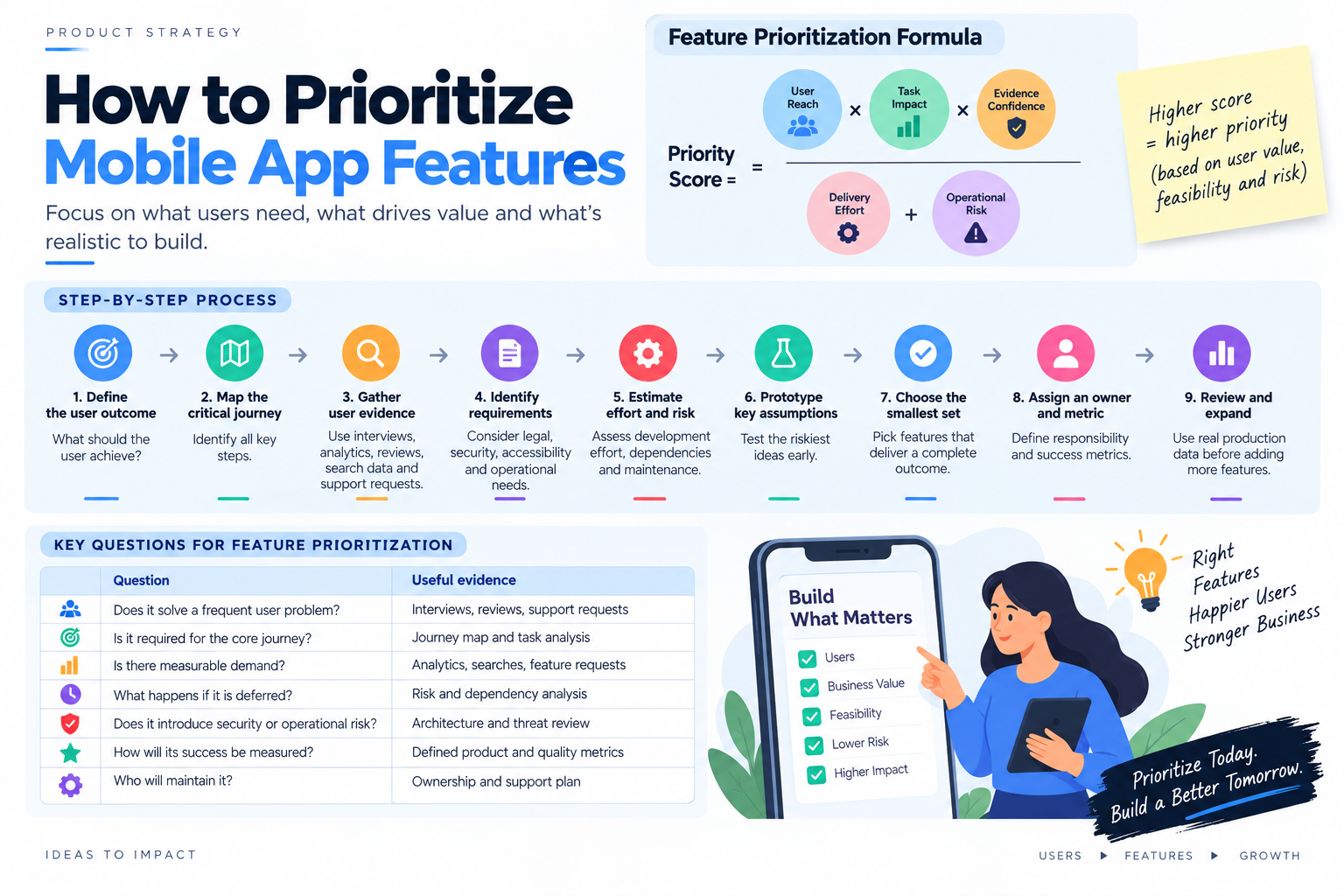
Feature prioritization should combine user evidence, business value, delivery effort, technical risk, and confidence.
A practical scoring model is:
Priority score = (user reach × task impact × evidence confidence) ÷ (delivery effort + operational risk)
Each factor can be scored from one to five. The result is not a financial forecast; it is a consistent way to compare competing ideas.
Use the following process:
- Define the primary user outcome.
- Map the complete critical journey.
- Gather evidence from interviews, analytics, reviews, search data, and support requests.
- Identify legal, security, accessibility, and operational requirements.
- Estimate delivery effort, dependencies, and ongoing maintenance.
- Prototype the riskiest assumption.
- Select the smallest set that delivers a complete outcome.
- Assign an owner and success metric to every feature.
- Review production evidence before expanding the scope.
A feature-prioritization discussion should answer:
| Question | Useful evidence |
| Does it solve a frequent user problem? | Interviews, reviews, support requests |
| Is it required for the core journey? | Journey map and task analysis |
| Is there measurable demand? | Analytics, searches, feature requests |
| What happens if it is deferred? | Risk and dependency analysis |
| Does it introduce security or operational risk? | Architecture and threat review |
| How will its success be measured? | Defined product and quality metrics |
| Who will maintain it? | Ownership and support plan |
How Should Teams Validate a Feature Before Building It?
Not every idea requires a production implementation to test its value.
Teams can validate features through:
- User interviews
- Journey observation
- Support-ticket analysis
- Search and behavioral data
- Clickable prototypes
- Usability testing
- Technical proof of concept
- Small beta groups
- Feature flags
- Phased rollout
- Controlled experiments where sample size and ethics allow
Validation should match the uncertainty. A prototype can test whether users understand a workflow, while a technical spike may be necessary to evaluate battery use, synchronization, device compatibility, or third-party integration risk.
How Do You Measure Whether a Mobile App Feature Works?
Every feature should connect to a user outcome and a measurable signal.
| Area | Example metrics |
| Performance | Startup time, latency, crash-free users |
| Onboarding | Completion, activation, time to first value |
| Navigation | Task completion, backtracking, abandonment |
| Search | Search success, zero-result rate, filter usage |
| Checkout | Completion, abandonment, payment failure |
| Notifications | Opt-in, disable rate, task completion |
| Offline operation | Offline completion, sync failures, conflicts |
| Support | Resolution rate, escalation, repeated contacts |
| Accessibility | Critical-task completion with assistive technology |
| Personalization | Selection, dismissal, reset, opt-out |
| Overall product | Retention, conversion, satisfaction, support volume |
Feature adoption alone is not enough. A capability may receive frequent use because users are forced through it, not because it is valuable.
Common Mobile App Feature-Planning Mistakes
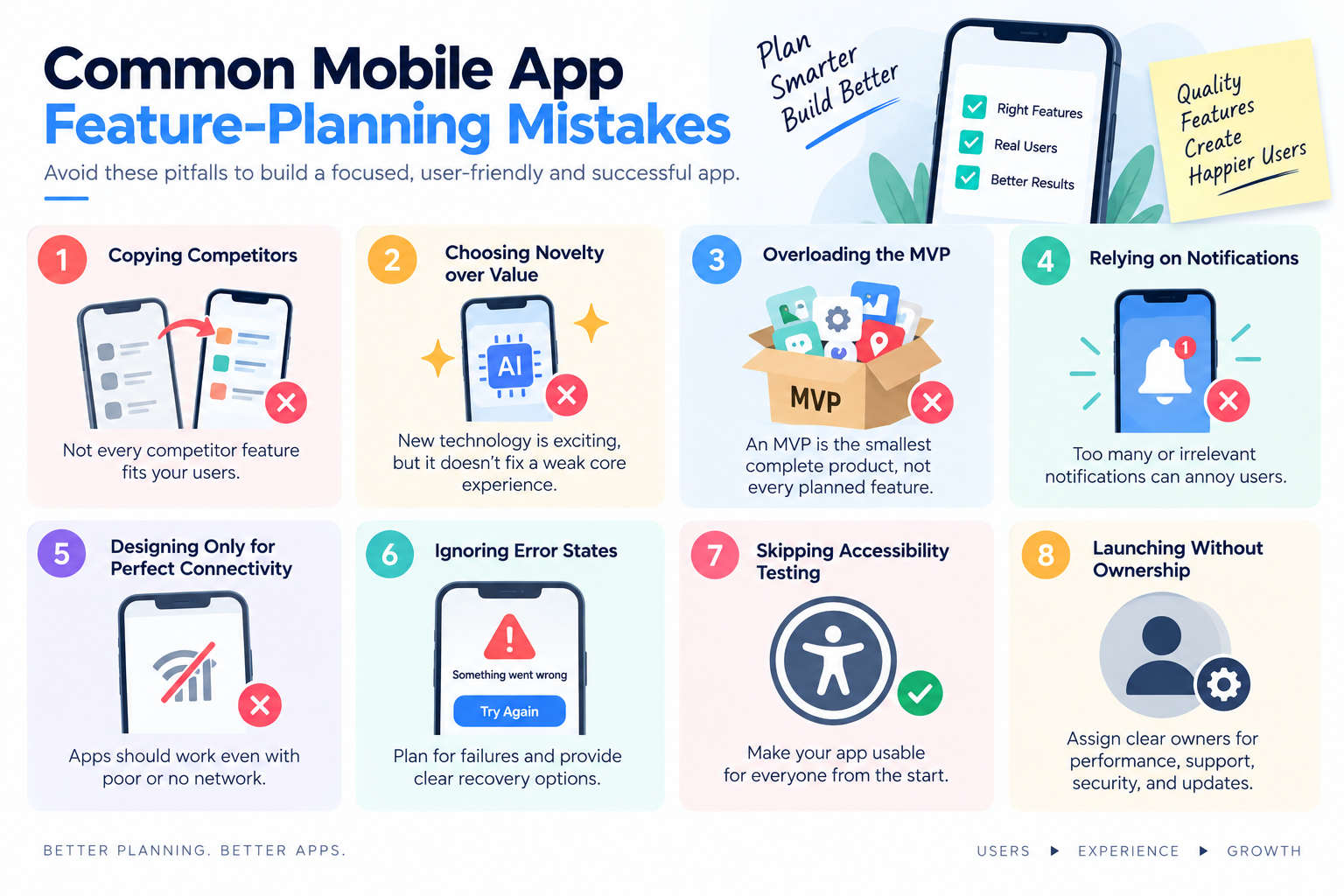
Treating Every Competitor Feature as Mandatory
A competitor may serve different users, operate under different constraints, or have added a feature that does not perform well. Competitive analysis should generate questions not automatically define scope.
Confusing Novelty With User Value
AI, augmented reality, and advanced animation can attract attention, but they cannot compensate for an unreliable core journey.
Overloading the MVP
An MVP is the smallest complete product that can test an important assumption. It is not a full roadmap compressed into the first release.
Using Notifications as a Substitute for Product Value
Notifications may bring users back temporarily, but irrelevant messages can cause users to disable permissions or uninstall the app.
Designing Only for Ideal Connectivity
Mobile users switch between networks, lose connectivity, receive calls, change orientation, and background the app. Critical journeys should survive realistic interruptions.
Ignoring Failure and Recovery States
Teams often design the ideal path and leave errors to developers. Recovery paths deserve explicit product and design decisions.
Shipping Without Accessibility Testing
Accessibility problems become more expensive to correct when they are embedded in navigation, components, and content patterns.
Launching Features Without Ownership
Every production capability needs someone responsible for its performance, support, security, measurement, and eventual retirement.
Mobile App Feature Checklist
Before approving a feature roadmap, confirm that the product covers the following areas.
Core Journey
- Is the app’s primary purpose immediately clear?
- Can users complete the main task without unnecessary steps?
- Are success and failure states defined?
Experience and Accessibility
- Is navigation predictable?
- Does the interface support assistive technology?
- Does content remain usable across supported screens and text sizes?
Performance and Reliability
- Are startup, latency, crashes, and freezes monitored?
- Is progress shown during longer operations?
- Is user state preserved after interruptions?
Security and Privacy
- Are authentication and authorization designed separately?
- Are permissions and data collection minimized?
- Have integrated SDKs been reviewed?
- Can users manage relevant privacy choices?
Connectivity
- What works without a network?
- How are queued actions, retries, and conflicts handled?
- Can users see synchronization status?
Engagement
- Do notifications have a clear purpose?
- Can users control message categories and frequency?
- Does personalization provide an explanation and opt-out?
Operations
- Does every feature have an owner?
- Is there a measurable success criterion?
- Are failures visible through production monitoring?
- Is ongoing maintenance included in the roadmap?
Frequently Asked Questions
What features should every mobile app have?
Every mobile app should provide a focused core journey, responsive performance, predictable navigation, accessibility, secure data handling, privacy controls, useful error recovery, and production monitoring. Other features depend on the product category and audience.
Which mobile app feature matters most?
The most important feature is the capability that completes the app’s primary user task. For a banking app, that may be secure account access and transactions. For a delivery app, it may be ordering and tracking. Supporting features should improve that journey.
How many features should a mobile app MVP include?
There is no universal number. An MVP should contain the smallest group of features required to complete one valuable end-to-end journey and test the product’s highest-risk assumption.
Are push notifications essential for every app?
No. Notifications are appropriate when users benefit from timely information outside the app. They should be relevant, permission-based, configurable, and linked to an actionable destination.
Should every mobile app work offline?
Not every app needs full offline operation. However, every app should define its behavior during slow or interrupted connectivity. Products used in travel, logistics, field service, healthcare, or productivity often benefit from stronger offline support.
When is mobile app personalization worth implementing?
Personalization is worthwhile when it reduces effort, improves discovery, or helps users complete tasks. It should use appropriate consent, reliable data, clear controls, and a way to correct or reset recommendations.
What security features should a mobile app include?
Requirements vary by risk, but common controls include secure authentication, authorization, encrypted communication, protected local storage, session management, dependency review, minimal permissions, secure recovery, and monitoring for suspicious activity.
Should a mobile app include an AI assistant?
Only when AI improves a defined workflow. The feature should have reliable input data, measurable value, clear limitations, safe error handling, privacy controls, and a human alternative for high-risk situations.
How should teams prioritize mobile app features?
Teams should compare features by user reach, task impact, business value, evidence confidence, delivery effort, operational risk, and dependencies. The highest priority should go to capabilities needed for a complete and reliable core journey.
How can a team tell whether a feature is successful?
Define the expected user outcome before development. Measure completion, time, errors, adoption, retention, support demand, or another relevant result after release. Avoid relying on clicks or screen views alone.
Final Takeaway
Successful mobile apps are not defined by how many features they contain. They succeed by helping users complete an important task quickly, clearly, securely, accessibly, and confidently.
Build the core journey first. Treat performance, privacy, reliability, and recovery as product requirements. Add engagement and emerging-technology features only when evidence shows that they solve a meaningful problem. This approach produces a smaller, more maintainable product and a more useful experience for the people it was built to serve.















