
ASUS ProArt P16 Review: I Used It as My Main Work Machine for 30 Days — Here’s the Truth
- 1 Quick Verdict for ASUS ProArt P16
- 1.1 Overall Rating: 8.4 out of 10
- 1.1.1 Beneficial For
- 1.1.2 Not beneficial for
- 2 Specifications of ASUS ProArt P16
- 2.1 Design & Build Quality
- 2.2 Display — The Real Star
- 2.3 Performance
- 2.4 CPU & GPU Power
- 2.5 Real-World Creative Benchmarks
- 2.6 Battery Life — Honest Numbers
- 2.7 Thermals & Fan Noise
- 2.8 Pros & Cons of ASUS ProArt P16
- 3 Final Verdict
I’ve been a MacBook Pro user for six years. I edit documentary work in DaVinci Resolve, manage Lightroom catalogs with 80k+ images, and sometimes do a bit of Blender when a client wants to speed things up.
I’ve been happy with my M3 Pro, but I was curious about the RTX 5090 in this ASUS ProArt P16. Can the Windows of the laptop ever be a threat to Apple’s dominance in the creative professional market in 2026? I used the topic as my only machine for 30 days in client shoots, editing sessions, and late-night deadline crunches.
I was surprised, both ways.
Quick Verdict for ASUS ProArt P16
Overall Rating: 8.4 out of 10
Beneficial For
- 4K video editors using DaVinci Resolve or Adobe Premiere.
- Mac users who want to run Windows on their Macs
- Photographers who are retouching on location using colour-critical techniques.
- 3D artists and professionals for motion graphics.
Not beneficial for
- Road warriors that require 8+ hours of untethered battery
- People who use laptops on their laps while working under a heavy load.
- For passengers, a 200W power brick is large
- USB 4 power users
Specifications of ASUS ProArt P16
| Specification | Detail |
| Processor | AMD Ryzen AI 9 HX 370 |
| GPU | NVIDIA GeForce RTX 5090 Laptop (120W TDP) |
| Display | 16-inch Lumina Pro OLED, 3840×2400, 120Hz |
| Brightness | 1,600 nits peak HDR / 1,000,000:1 contrast ratio |
| Colour Accuracy | Delta E <1.0, Pantone validated |
| RAM | Up to 64GB LPDDR5X |
| Storage | Up to 4TB NVMe SSD |
| Battery (PCMark 10) | 10 hours 24 minutes at 150 nits |
| Weight | 4.30 lbs (1.95 kg) |
| Thickness | 14.9mm (~0.59 inches) |
| Ports | 1× USB 4-C, 1× USB-C 3.2 Gen 2, 2× USB-A 3.2 Gen 2, HDMI 2.1 FRL, SD Express 7.0, 3.5mm |
| Wireless | Wi-Fi 7, Bluetooth 5.4 |
| Operating System | Windows 11 Pro |
| Starting Price | From ~$2,999 (RTX 5090 config ~$4,500+) |
Design & Build Quality

The first thing you see is restraint. The Nano Black chassis is deep, matte, and fingerprint-resistant, and ASUS didn’t design it for the gamer’s looks.
For two weeks, I wore it every day in a Shimoda backpack with camera equipment without ever complaining about its weight. The hinge is firm. The lid is self-opening. It is more of a tool than a toy.
Display — The Real Star
The Lumina Pro OLED panel is really the best laptop display I’ve ever seen. That’s not hyperbole. Color-grading footage on this screen is entirely different, and it has a refreshing rate of 120Hz refresh rate, 1,600 nits of peak HDR brightness, and a 1,000,000:1 contrast ratio. If the Delta E is less than 1.0 and validated by Pantone, then what I see is what the client gets.
I color-graded a full corporate documentary on this panel and sent it to a DCI-P3-certified monitoring suite; it was a perfect grade.
The anti-reflective coating proved its worth at an editing session at a coffee shop with a window. The touchscreen is a real plus – I found myself using my finger to scrub timelines more than I thought I would.
Performance
CPU & GPU Power
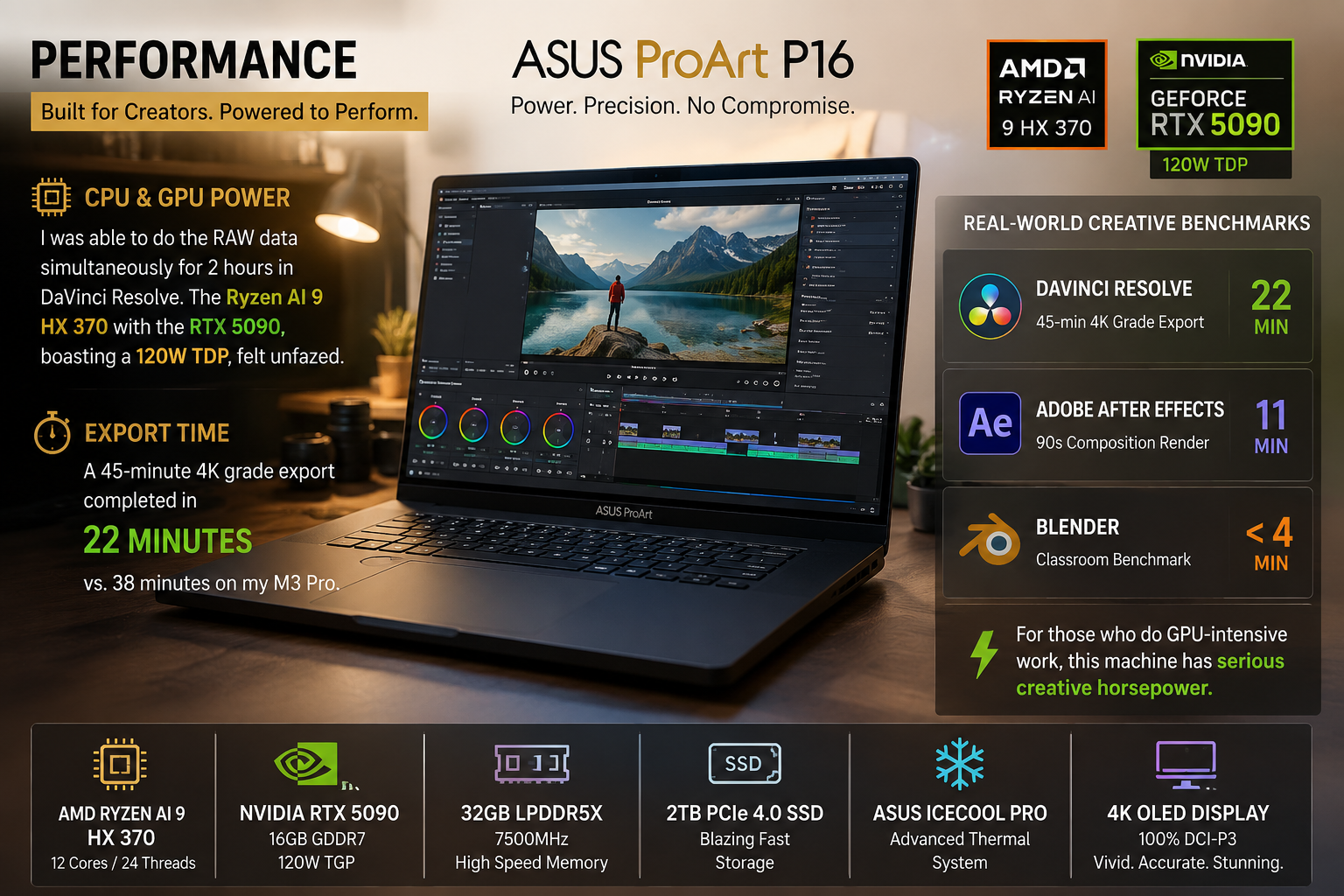
I was able to do the RAW data simultaneously for 2 hours in DaVinci Resolve. The Ryzen AI 9 HX 370 with the RTX 5090, boasting a 120W TDP, felt unfazed. The export time for a 45-minute 4K grade was a flat 22 minutes, compared to 38 minutes on my M3 Pro.
Real-World Creative Benchmarks
A 90s piece was created in Adobe After Effects in 11 minutes. Blender’s classroom benchmark has come to an end in less than 4 minutes. For those who do GPU-intensive work, this machine has serious creative horsepower.
Battery Life — Honest Numbers
So here’s the truth about me. On a mixed workday, I was able to get 6.5 to 7 hours. In a controlled test, PCMark 10 at 150 nits returns 10 hours 24 minutes.
The battery level dropped from 75% to 33% in under 40 minutes after I opened DaVinci Resolve with three 4K streams. Gaming is even more intense — Helldivers 2 for 30 minutes took 42 numbers. In real-world creative use, the MacBook Pro M4 has the competition beat by two to three hours. Bring the brick. Always.
Thermals & Fan Noise
Desk job – perfectly doable. I wouldn’t recommend having it on your lap during a heavy Resolve session.
The fan noise is heard at full throttle, but it’s not a whine; I’d say a whoosh. The fans are almost silent when performing simple tasks such as writing or browsing.
Pros & Cons of ASUS ProArt P16
| Pros | Cons |
| Best laptop display available — 4K OLED, Delta E <1.0 | Only one USB 4 port on a $4,500 machine |
| RTX 5090 dominates GPU-bound creative tasks | Battery collapses fast under GPU load |
| SD Express 7.0 at 985 MB/s accelerates card offloading | 200W power brick too large for a portable machine |
| Premium Nano Black build, just 15mm thin | Runs hot under full load — not a lap machine |
| Touchscreens add real utility for editors and retouchers | Windows still lags behind macOS for audio production |
| ~£2,200 cheaper than a comparable MacBook Pro 16 | — |
Final Verdict
After being Windows-resistant for six years, I have to say the ASUS ProArt P16 is the most compelling Windows challenger to the MacBook Pro I’ve ever tested. For any color-critical professional, the display is a serious consideration.
The RTX 5090 delivers raw creative performance that Apple’s unified memory architecture can’t match for GPU-heavy workflows. However, the battery compromise is real; the single USB-C port is a bit of a pain at this price, and you will need a desk nearby. This machine is incredible for GPU-intensive work when the power outlet is nearby. If you require eight hours without a tether, you’ll need to find another option.
FAQs
Which is the better video-editing machine: the ASUS ProArt P16 or the MacBook Pro?
Yes, the RTX 5090 is much faster for tasks that require a lot of GPU power, such as 4K RAW rendering in DaVinci Resolve. The MacBook Pro is the better choice for battery life and audio production workflows. It really depends on your needs.
What is the battery life of the ASUS ProArt P16?
It is capable of 10 hours 24 minutes in PCMark 10 and 5–7 hours in real-world creative applications in Resolve, Lightroom or After Effects. It consumes power very rapidly when fully loaded by the GPU, 42% after 30 minutes of gaming.
Is the ASUS ProArt P16’s display excellent?
It features the Lumina Pro OLED — 4K 120Hz, Delta E under 1.0, Pantone-validated, and with a peak HDR brightness of 1,600 nits. One of the top laptop displays on the market for color-critical professional use.
In 2026, how much will the ASUS ProArt P16 cost?
Base configurations start around $2,999. The highest-spec’d RTX 5090 configuration tested here costs around $4,500, which is much less than a similarly specced MacBook Pro 16 with 64GB of RAM and 4TB of storage.