Figma Design Review: My Real Experience with Client Projects
I used to juggle several tools to complete a single UI project. Figma design was mentioned when I needed to find a simpler method of working with layouts, prototyping, and feedback in a single location. The transition between applications was slow, and client updates frequently became protracted back-and-forth discussions.
I decided to use Figma to improve that workflow. I began to use it for client UI work, landing pages, and small team projects. In the beginning, sharing designs and getting instant feedback was remarkably easy. It transformed my approach to revisions and made the process of collaboration seem quicker and more direct.
Quick Verdict for Figma Design
Rating: 9 out of 10
Best for:
- UI designers, freelancers, remote teams
Not suitable for:
- Heavy offline workflows, advanced graphic editing
Verdict: Figma design made my workflow faster and cleaner, especially for client collaboration
Key Features of Figma Design
| Feature | Details |
| Platform | Web-based, works in a browser |
| Best Use | UI and UX design |
| Collaboration | Real-time editing and comments |
| Prototyping | Built-in, no extra tools needed |
| Design Systems | Components, styles, shared libraries |
| Plugins | Large and active ecosystem |
| Performance | Smooth for most projects, slight lag on heavy files |
| Offline Support | Limited |
| Pricing | Free plan available, paid plans for teams |
Getting Started and First Impressions
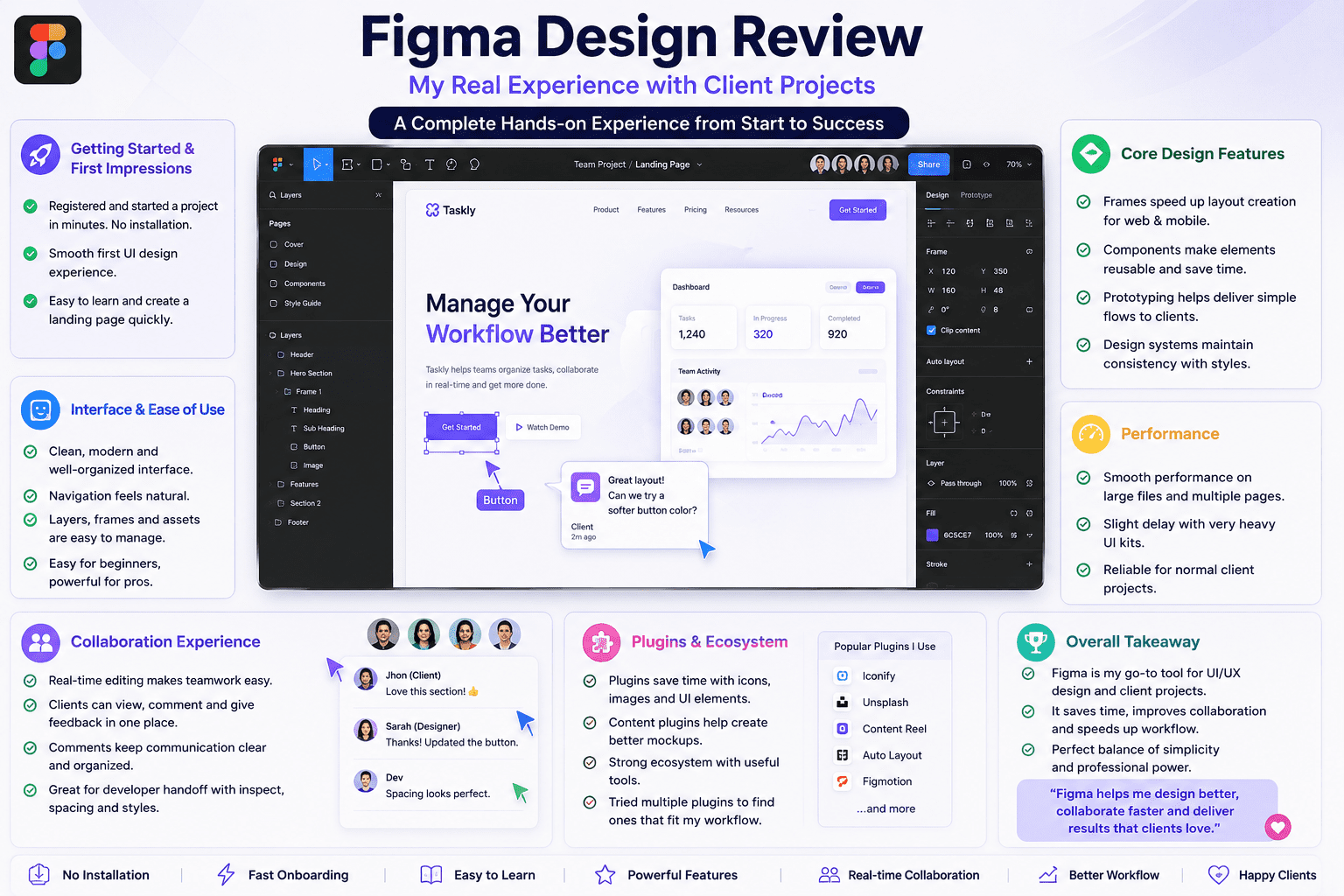
I registered and began a project in a few minutes. No installation. That in itself was time-saving.
My first UI design was smooth. The canvas reacted effectively, and I did not experience confusion when laying elements. I found that even the simplest Figma interface controls were simpler than the other tools I had previously used.
It was easy to learn and get started. I could create a landing page without watching lengthy tutorials, which helped me get actual work done quickly.
Interface and Ease of Use
The interface is clean and well-organized. I tried it on small UI tasks initially. Navigation felt natural. Layers, frames, and assets were simple to handle. I found Figma’s design simpler in day-to-day activities as compared to tools such as Adobe XD.
It is easy to pick up as a beginner, yet deep enough to satisfy experienced users. I was not constrained when creating structured layouts or design systems.
Core Design Features
Frames helped me to develop layouts faster. I used them for mobile screens and web sections. This minimized the clutter in my projects.
Elements were a significant element of my workflow. I designed reusable cards and buttons. All changed during the design as I updated one. This saved time on client revisions. Simple flows were well supported by prototyping. I attached screens and sold them to the customers. The majority of UI projects were adequate.
In the case of design systems, I was able to control colors and text styles. This aided in consistency between pages. I applied Figma components and frames on a daily basis, particularly in recurrent layouts.
Performance
I tried Figma on larger files containing several pages. It remained smooth most of the time.
However, I did notice a slight delay when using very heavy UI kits. This slowed me down in detailed edits. It was not a deal breaker, but it was indicative of boundaries.
In the case of normal client projects, performance remained consistent. It handled the load well, even with multiple screens.
Collaboration Experience
This is where Figma comes in. I worked with clients who had no design background. I sent a link, and they could see all at a glance. No exports. No confusion.
Team projects were assisted by real-time editing. I saw changes as they happened. This minimized delays in feedback.
Communication was clear with the comment feature. Clients indicated items directly rather than using long messages.
It was effective in the case of developer handoff. Elements, spacing, and colors could be checked by developers without having to ask me about them over and over. This assisted me in avoiding unnecessary calls.
Plugins and Ecosystem
I experimented with a number of Figma extensions in actual projects. Others assisted in accelerating work significantly.
Icon, image, and UI element saving time through plugins. I was able to draw ready assets faster as opposed to creating everything on my own.
Mockups were filled with the aid of content plugins. This enhanced the quality of presentation in client reviews.
The ecosystem is robust, yet not all the plugins are trustworthy. I needed to experiment with some before I discovered some that would fit my workflow.
Also Read- Bambu Lab A1 Review: My Real Experience Using It for Everyday 3D Printing
Real World Usage
I worked with Figma to design client UI regularly. Mobile screens, landing pages, and dashboards. It handled them all.
For freelance work, sharing was easy. Clients could view designs without asking for files. This improved communication and minimized confusion.
I was able to update layouts and resend links in just a few minutes in quick edits. This helped me respond faster to client changes.
I also worked with another designer on the same file. We divided sections and worked together without conflicts. That helped speed things up in larger projects.
Pros and Cons
Pros
- Easy to start and use daily
- Strong real-time collaboration
- Great for UI and UX workflows
- Components save time in revisions
- Works directly in the browser
Cons
- Slight lag in heavy files
- Limited offline support
- Not ideal for complex graphic design tasks
Pricing
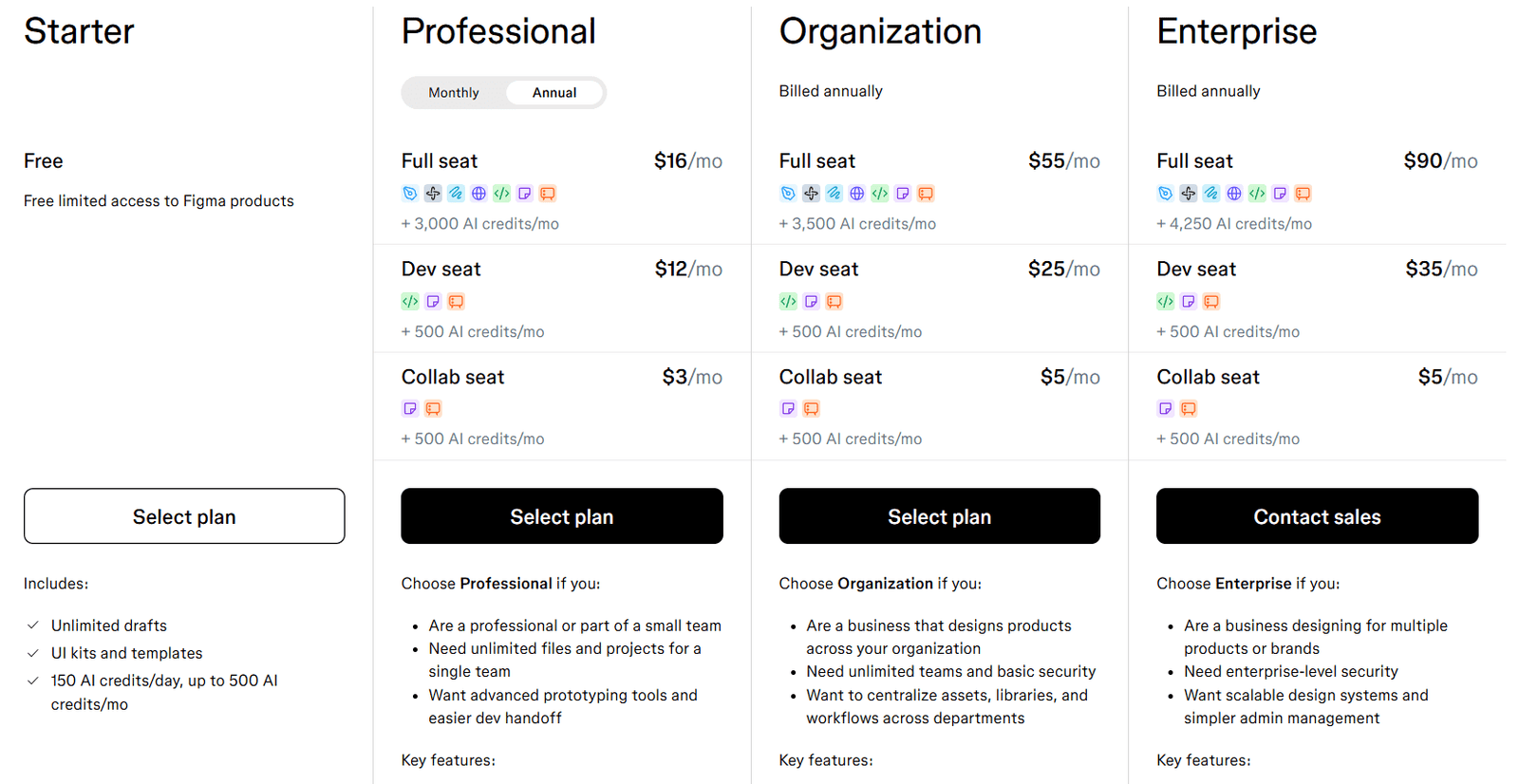
The free plan works well for individuals and small projects. I spent some time using it without problems.
Teams can use paid plans. Features like shared libraries and better project management are very useful in team settings.
You do not need to upgrade immediately, especially when you are a freelancer. However, as your team grows, the premium version is worth it.
Final Verdict
After using Figma design in real client projects, I can say that it has genuinely improved my work process. Less switching between different tools, smoother collaboration, and faster delivery are the benefits I enjoyed most.
If you are a UI designer, freelancing, or part of a team, adding Figma to your tools will fit well into your daily work.
For the main design activities, Figma can be a very good and useful option for you.
FAQs
Is Figma design good for beginners?
Yes. I started using it without deep training. The interface is simple and easy to understand.
Can Figma replace other design tools?
For UI and UX work, yes. I stopped using multiple tools after switching.
Is Figma free for teams?
It has a free plan, but teams may need paid features for full collaboration control.
Does Figma work offline?
Not fully. It works best with an internet connection. Offline use is limited.