i9 14th 14900k Review: My Real Performance and Heat Test
- 0.0.1 Not Suitable For:
- 1 Specifications of i9 14th 14900k
- 1.1 Performance (Gaming & Productivity)
- 1.2 Thermals & Power Consumption
- 1.3 Overclocking Experience
- 1.4 Real World Usage of i9 14th 14900k
- 1.5 Compatibility & Setup
- 2 Pros & Cons of i9 14th 14900k
- 2.0.1 Decision Takeaway
- 2.1 Pricing and Value
- 3 Final Verdict
My old system started to delay when workloads were high. Timeline rendering slowed, and a gaming session had previously stuttered horribly while I was multitasking with background applications open. The fact that the system had frozen at a time when I was exporting a project made me upgrade.
i9 14th 14900k is the Intel flagship 14th-generation desktop processor designed for extreme performance, multitasking, and high-end gaming. The target users are gamers, video editors, 3D creators, and professionals who need high performance under load.
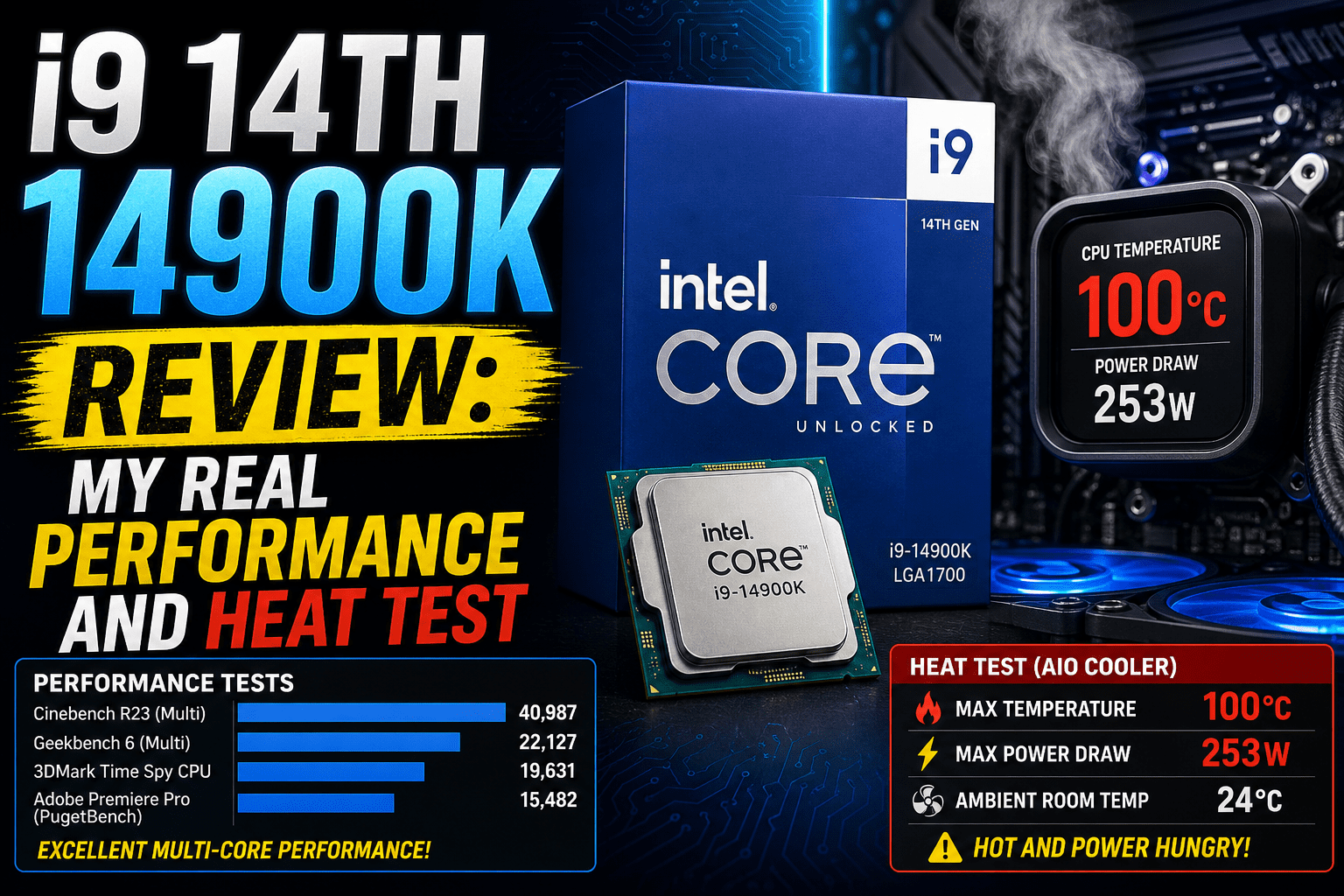
I chose to change after being bottlenecked several times during editing and gaming, and this i9 14th 14900k review is based on my real-world experience with performance, heat, and sustained workload under pressure based on my actual usage in a variety of demanding tasks, daily testing.
Rating: 8.8/10
- d gaming at high FPS settings
- 4K video editing and rendering workloads
- Heavy multitasking with demanding apps
- 3D design and simulation work
Not Suitable For:
- Budget gaming builds
- Low-power or silent PC setups
- Users with basic office tasks only
- Compact systems with weak cooling
Specifications of i9 14th 14900k
| Specification | Details |
| Cores / Threads | 24 cores (8 P-cores + 16 E-cores) / 32 threads |
| Base / Boost Clock | 3.2 GHz base, up to 6.0 GHz boost |
| Cache | 36 MB L3, 32 MB L2 |
| TDP | 125W base, up to 253W max turbo |
| Architecture | Raptor Lake Refresh |
| Socket Type | LGA1700 |
| Integrated Graphics | Intel UHD Graphics 770 |
| Memory Support | DDR5 up to 5600 MT/s, DDR4 up to 3200 MT/s |
| Overclocking Support | Yes, unlocked multiplier |
| Manufacturing Process | Intel 7 (10nm class) |
Performance (Gaming & Productivity)
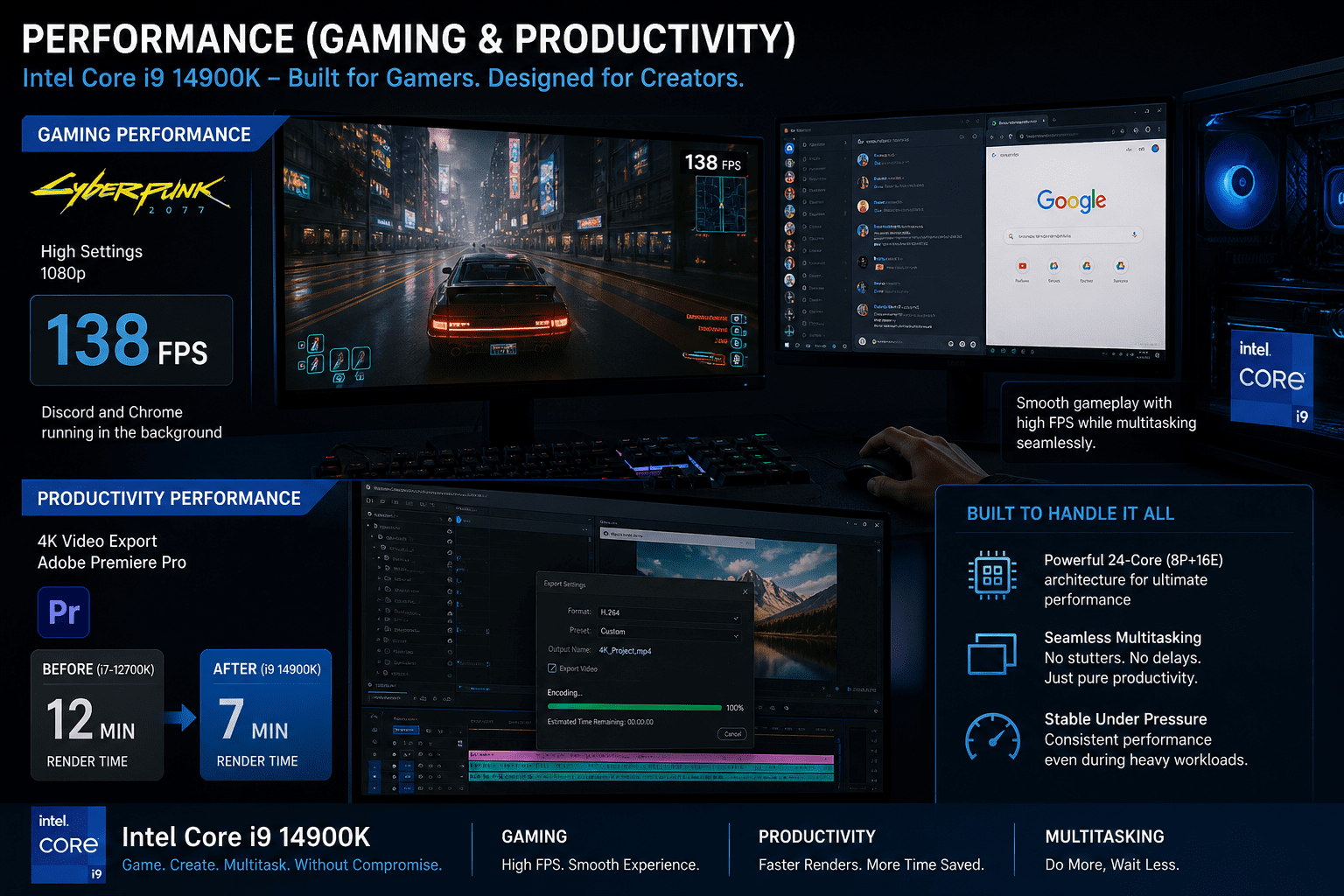
I tested the Intel Core i9 14900K processor in both gaming and video editing tasks on the computer.
In a gaming session, the game Cyberpunk 2077 ran at around 138 frames per second on high settings, and I had Discord and Chrome open in the background. The Intel Core i9 14900K processor really helped.
During a 4K video export in Premiere Pr,o the render time for the video dropped from 12 minutes to 7 minutes, with the Intel Core i9 14900K processor.
The ability to multitask between editing software, browsing, and communication apps did not experience stutters or delays. The system remained receptive even when it was under pressure.
Takeaway: This CPU provides evident performance improvements in both gaming and heavy productivity workloads with quicker output and consistent multitasking.
Also Read- Review of Microsoft Surface Pro 9 (Intel) Specs, Features, and Why Purchase Worth it
Thermals & Power Consumption
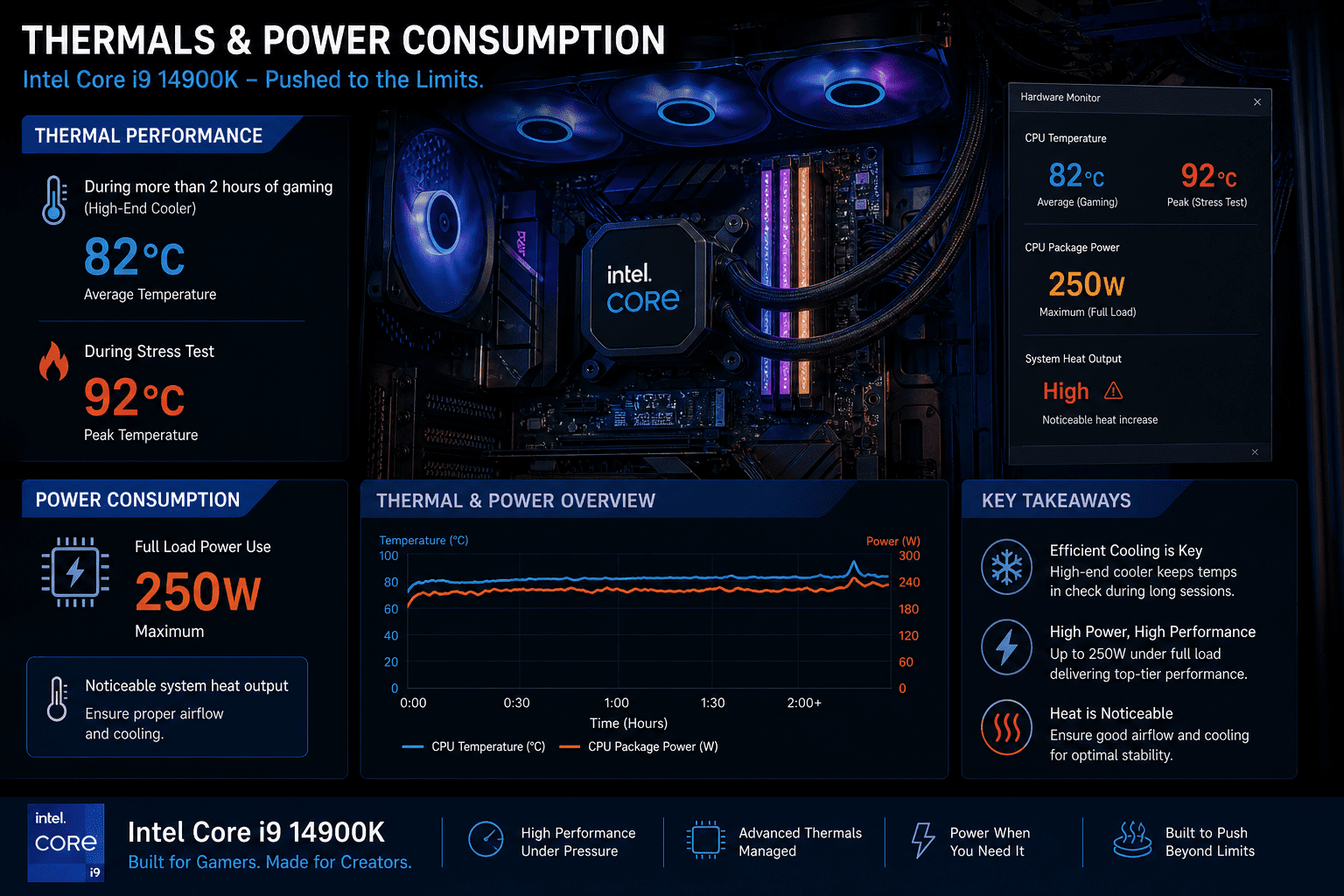
I tested Intel Core i9 14900K during long gaming and rendering. During more than two hours of gaming, temperatures remained at approximately 82°C with a high-end cooler, but peaked at 92°C when stress testing. Full load power use was at its highest at around 250W, and this was clear in system heat output.
Takeaway: This CPU is warm and needs good cooling to maintain stability in long, heavy workloads.
Overclocking Experience
I tried light overclocking on Intel Core i9 14900K to observe actual performance improvements. I drove P-cores to 5.8 GHz with voltage held constant. Performance in Cinebench was approximately 12 percent better than stock settings. In gaming, FPS improvements were less, approximately 5-8 FPS in CPU-intensive scenes.
But stability was an issue with longer sessions, particularly when temperatures exceeded 90 C. I was forced to lower the settings a bit to prevent system crashes.
Takeaway: Overclocking can be measured to provide real benefits, but it needs to be carefully adjusted and well-cooled to remain stable.
Real World Usage of i9 14th 14900k
I used the Intel Core i9 14900K processor for my tasks. In gaming, I played matches,s and my frame rate stayed above 140 FPS. The game played smoothly without any interruptions.
When I edited videos, a 4K travel project took longer than 8 minutes to export. I could also scroll through the timeline without any lag.
While I streamed my gameplay using OBS, the CPU handled the video encoding and other apps I had open without dropping any frames.
For my productivity work, I had Chrome tabs, Excel sheets,s and research tools open at the same time. The processor handled all of them without slowing down. It performed consistently across all my tasks.
The main thing I learned is that this CPU can handle gaming, video editing, streaming, and multitasking without slowing down.
Compatibility & Setup
I put the Intel Core i9 14900K processor into an LGA1700 motherboard that supports DDR5 RAM. The motherboard needed a BIOS update before it worked properly. This took some time to set up.
I paired it with a 360mm cooler because air cooling wasn’t enough when the processor was under heavy load. The RAM needed some time to train when I first started up the system. It took a minute,s but then everything worked smoothly.
The power supply and cooling setup were important for operation. The main thing I learned is that this CPU works best in a high-end computer build with cooling and an updated BIOS.
Pros & Cons of i9 14th 14900k
| Pros | Cons |
|---|---|
| Delivers solid gaming performance, even while other applications are running in the background. | Can overheat during gaming and rendering without a high-performance cooling solution. |
| Speeds up video editing, 3D rendering, and other demanding creative workloads, saving time. | High power consumption generates additional heat and increases energy usage. |
| Handles heavy multitasking smoothly without noticeable slowdowns. | Overpowered for basic gaming, office work, or everyday tasks, making it poor value for light users. |
| Performs reliably during extended workloads when paired with an effective cooling system. | May experience thermal throttling if cooling or BIOS settings are not properly optimized. |
Decision Takeaway
Buy it only when you need the highest level of gaming and productivity performance, and when you are ready to spend on powerful cooling and a high-end system.
Pricing and Value
Intel Core i9 14900K costs a lot, similar to AMD Ryzen 9 and other high-end CPUs. I used it. It performs great for gaming and productivity, but it’s very expensive compared to mid to high-range processors.
Ryzen 9 7950X, for example,e offers multi-core performance with better efficiency in some tasks. This CPU is a good choice if you already have a strong computer and really need the best performance for gaming, video rendering, ng or heavy multitasking. For people,ple the extra cost doesn’t make a big difference in their daily use.
Takeaway: Upgrading to Intel Core i9 14900K is only worth it if you need extreme performance; ance otherwise, mid-high CPUs like Ryzen 9 give you better value for the money.
Final Verdict
After using the i9 14th 14900K in real gaming, editing, and heavy multitasking, I can say that it provides extreme performance without any reservations. It can easily support high FPS gaming, quick 4K rendering, and continuous background workloads. However, there are clear trade-offs to this power. It is warm, drains a lot of power, and needs good cooling to maintain stability under pressure. To me, the most important lesson is simple.
This CPU is designed as a performance-oriented rather than an efficiency or budget-oriented CPU. When you are upgrading a mid-range or high-range processor, the improvements are noticeable. Only demanding users will find it worth it.
FAQs
Is the i9 14th 14900K good for gaming?
Yes, the i9 14 th 14900K is a great gaming processor. It provides extremely high FPS in contemporary AAA and competitive games, even at high settings. In practice, it remains stable in CPU intensive titles but requires good cooling to prevent heat spikes in long sessions.
Does the i9 14th 14900K run hot?
Yes, it overheats when loaded. Gaming and rendering may reach temperatures of more than 80C and peak at 90C with less powerful cooling. During my testing, a 360mm liquid cooler was required to maintain performance during long workloads.
Is the i9 14th 14900K worth upgrading from older CPUs?
Only when you need important improvements in gaming performance, rendering speed, or multitasking capability, is it worth upgrading. In case your existing CPU is already performing the daily tasks without any problems, the performance increase might not be worth the money and cooling needs.