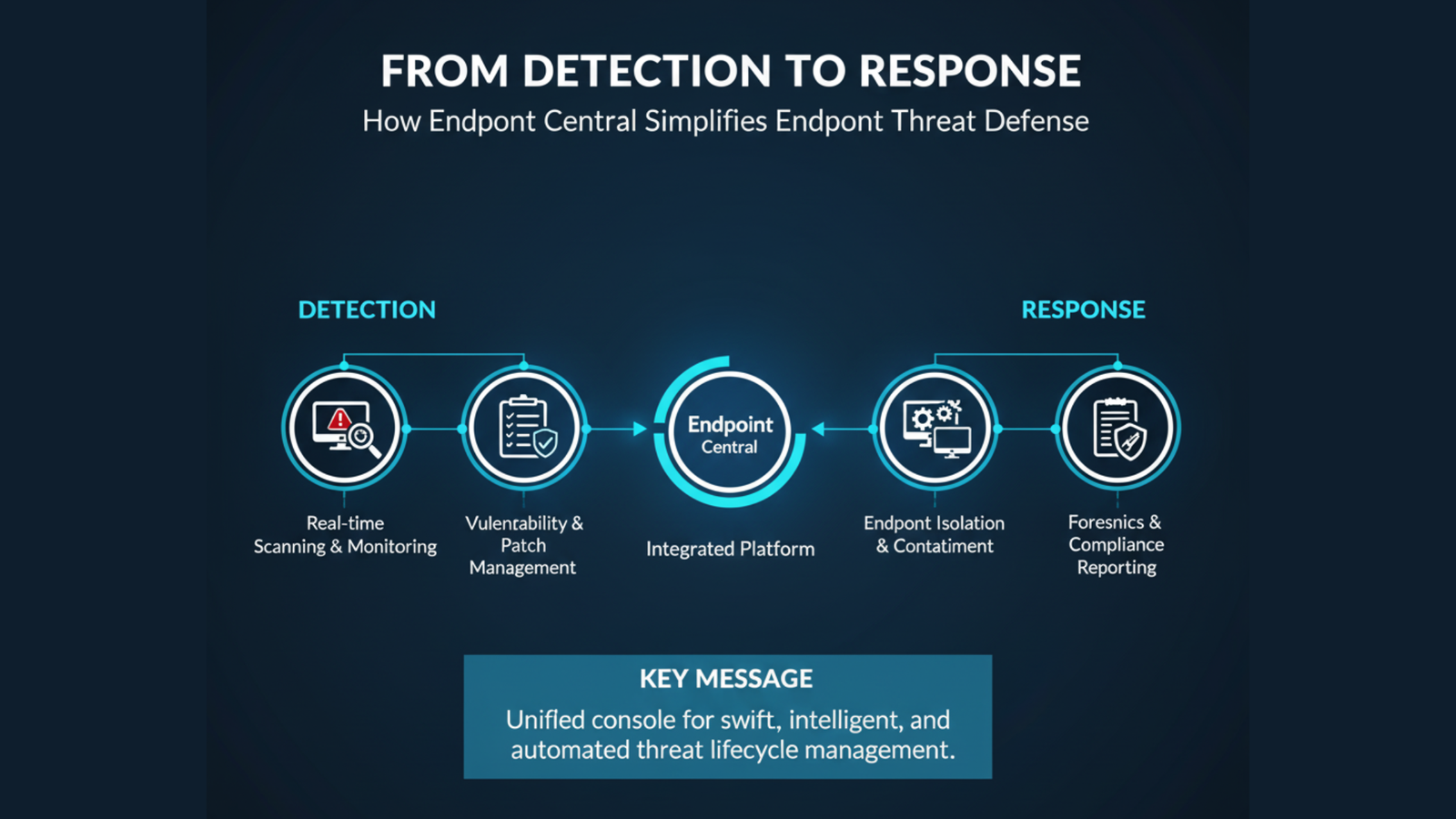
From detection to response: How Endpoint Central simplifies endpoint threat defense
- 1 What is Endpoint Central?
- 2 How Endpoint Central Simplifies Threat Detection
- 3 Streamlined Response with Endpoint Central
- 4 Centralised Endpoint Management for Better Security
- 5 The Benefits of Using Endpoint Central for Endpoint Threat Defence
- 5.1 1. More safety with defence on more than one level
- 5.2 2. Less company lost time and downtime
- 5.3 3. Scalability and Flexibility
- 5.4 4. Cost-Effective and Easy to Use
- 6 Conclusion
Learn how ManageEngine Endpoint Central helps defend against hacks by finding threats in real time, responding automatically, and managing everything from one place.
How can companies protect their clients from complex cyberattacks that are always changing? The cybersecurity landscape is changing very quickly these days. Endpoint security is very important because hackers are still looking for holes in machines that they can use. One of the best ways to deal with this issue is to use full endpoint protection options such as ManageEngine Endpoint Central.
Zoho Corporation’s Endpoint Central is a strong solution that helps companies improve their endpoint security by giving them all the tools they need to find threats in real time and take action right away. We’ll look at how Endpoint Central makes it easier to keep businesses safe and guard against computer threats in this post.
What is Endpoint Central?

ManageEngine Endpoint Central – Unified Endpoint Management system protects and manages a lot of different types of devices, like laptops, computers, servers, and mobile phones. It has tools for finding holes in security, making sure patches are always up to date, protecting against hackers, and more. A business can manage all of its connections from one place with Endpoint Central. With this, devices are safer from the newest online threats, and security worries go down. The app might work on a lot of different OSes, like Windows, macOS, and Linux. You can put Endpoint Central on your own servers or in the cloud. It works for businesses of all kinds and in all fields. Because it has so many useful features, IT experts can keep an eye on computer security issues, find them, and fix them before they happen.
How Endpoint Central Simplifies Threat Detection
1. Real-Time Threat Detection
An important part of computer security is being able to spot threats as they happen. To keep an eye on endpoints in real time, Endpoint Central uses cutting-edge monitoring technologies such as machine learning and behavioural analysis. It can find possible risks by noticing odd behaviour and actions, whether they are known or not. This method cuts down on the time it takes to move after discovering a threat, which helps businesses stay one step ahead of thieves. Because it sends alerts in real time and lets companies react automatically, Endpoint Central makes sure that problems are found quickly and fixed before they cause a lot of damage.
2. Antivirus and Anti-Malware Protection
Endpoint Central has strong antivirus and anti-malware features that are needed to keep endpoints safe from common threats like ransomware, viruses, and trojans. Using strong scanning methods, the software may be able to find dangerous files and apps on all of your devices. It updates virus definitions on its own so that it can keep up with new and changing threats. By checking and updating endpoints all the time, you can keep them safe from the latest types of malware. This keeps threats from getting to important systems.
Streamlined Response with Endpoint Central
1. Automated Threat Response
When there is a threat, it is very important to move quickly and well. Some parts of the response are done automatically by Endpoint Central, which makes the process easy. Endpoint Central can do the following when it sees a threat:
- Put the vulnerable file or device in storage.
- You should stop using apps or tools that are unsafe.
- Remove devices that are having problems from the network from afar.
People are less likely to make mistakes when these reactions are set to happen automatically. Threats are also dealt with right away, which lowers the risk of more damage or data breaches.
2. Remote Control and Remediation
You can run things from afar, which is one of the best things about Endpoint Central. Troubleshoot and fix endpoints from afar, so IT teams don’t have to be there in person to fix problems right away. IT experts can act faster and better with remote control, whether they need to get rid of malware or return to a safe state. Endpoint Central also solves problems on its own, like closing security holes or making sure that software is up to date with the latest security patches. This automatic patch management makes sure that all devices always have the most up-to-date security patches. This keeps hackers from using old software to do harm.
Centralised Endpoint Management for Better Security
1. Unified Endpoint Management (UEM)
Many endpoints can be hard to keep track of. Endpoint Central’s unified endpoint management (UEM) is here to help. IT experts find it easier to handle, set up, and keep an eye on all endpoints across the company if they put them all on a single management dashboard. IT managers can use this centralised panel to keep an eye on security, find holes, and make sure that all endpoints follow security rules. This centralised method makes sure that all security measures are the same, and it lowers the risk of making mistakes that would happen if you had to handle each device individually.
2. Compliance and Reporting
Endpoint Central not only makes it easy to find threats and deal with them, but it also has tools for keeping up with compliance. There are many parts of endpoint security that the software can report on in great depth, such as
- How is patch handling going
- Good health of antivirus
- Encrypting of hardware
- Take care of things
Companies use these reports to stay on the right side of the law and get a good idea of how safe their destinations are. Firms can remain in line with industry standards and make it easy for auditors to see that they are following the rules by sending out regular compliance reports.
The Benefits of Using Endpoint Central for Endpoint Threat Defence
1. More safety with defence on more than one level
Endpoint Central has a multi-layered defence system that includes firewalls, antivirus, anti-malware, web filtering, and device control to protect against a wide range of online threats. This method protects clients everywhere they could be attacked.
2. Less company lost time and downtime
It takes less time to keep systems safe because Endpoint Central can find and fix problems right away. When businesses can find and fix problems faster, they have less downtime and less trouble with their daily operations.
3. Scalability and Flexibility
No matter how big or small your business is, Endpoint Central can grow with it. It can connect to a lot of different devices, like PCs, laptops, computers, and phones. Because of this, businesses in a lot of other areas can use it. Enterprises have more freedom with cloud deployment because they can manage targets from anywhere in the world.
4. Cost-Effective and Easy to Use
Businesses can save money on endpoint security management with Endpoint Central because it gets rid of the need for multiple security options. The software’s straightforward interface also lets IT staff handle endpoint protection without having to go through a lot of training.
Key Features at a Glance
- Using machine learning and motion analysis to find threats in real time
- Full defence against viruses and other software to keep you safe from many threats
- Endpoints are safe because automated patch management makes sure they have the most up-to-date fixes.
- Features on the remote handle for quick fixes and troubleshooting
- Tools for conformity and reports that help you meet standards in your field
- One control console lets you keep an eye on and set up all endpoints.
Conclusion
As cyber threats get smarter, businesses need an endpoint security system that covers everything and is simple to use. ManageEngine Endpoint Central makes it easier to defend against endpoint threats by giving you advanced tools for finding them, automated responses, and control from one place. These features can help companies protect their endpoints from new threats and keep their IT systems safe.
Frequently Asked Questions
What is ManageEngine Endpoint Central used for?
ManageEngine Endpoint Central is a complete endpoint security management tool that can find threats, handle patches, protect against viruses, and report on compliance.
How does Endpoint Central find threats right now?
Using machine learning and behavioural analysis, Endpoint Central keeps an eye on what endpoints do and looks for odd behaviour. This makes it quick and easy to find any risks.
Can Endpoint Central be used on more than one OS?
Windows, macOS, and Linux are just a few of the operating systems that Endpoint Central can connect to. Because of this, it can be used in many business situations.
What does Endpoint Central do when it finds a danger?
Endpoint Central instantly puts infected devices in quarantine, stops harmful processes, and lets you fix problems on them from afar when there is a threat.
Does Endpoint Central work well for small companies?
Yes, Endpoint Central can grow with your business. It works well for companies of all sizes, from small to big. It lets you set it up in different ways, like on your own computers or in the cloud.