ShotVu: The Smarter Way to Record with AI Eyes on Camera
- 1 Why AI Eyes on Camera Matters
- 2 All-in-One Features of ShotVu
- 2.1 🎥 Screen + Webcam Recording
- 2.2 📝 AI Notes & Smart Summaries
- 2.3 💬 Automatic Transcripts
- 2.4 📜 Built-In Teleprompter
- 2.5 🌍 Instant Sharing & Collaboration
- 2.6 🔒 Privacy & Security
- 2.7 💡 Simplicity That Scales
- 3 How ShotVu Improves Productivity
- 4 Who Should Use ShotVu?
- 5 Conclusion
- 6 FAQ
In a world where video communication has become the standard — from team updates to online courses, product demos to YouTube content — the demand for professional, polished recordings has never been higher. But let’s be honest: recording a video isn’t always easy. Between maintaining eye contact, managing your notes, and ensuring your audience stays engaged, it can feel overwhelming.
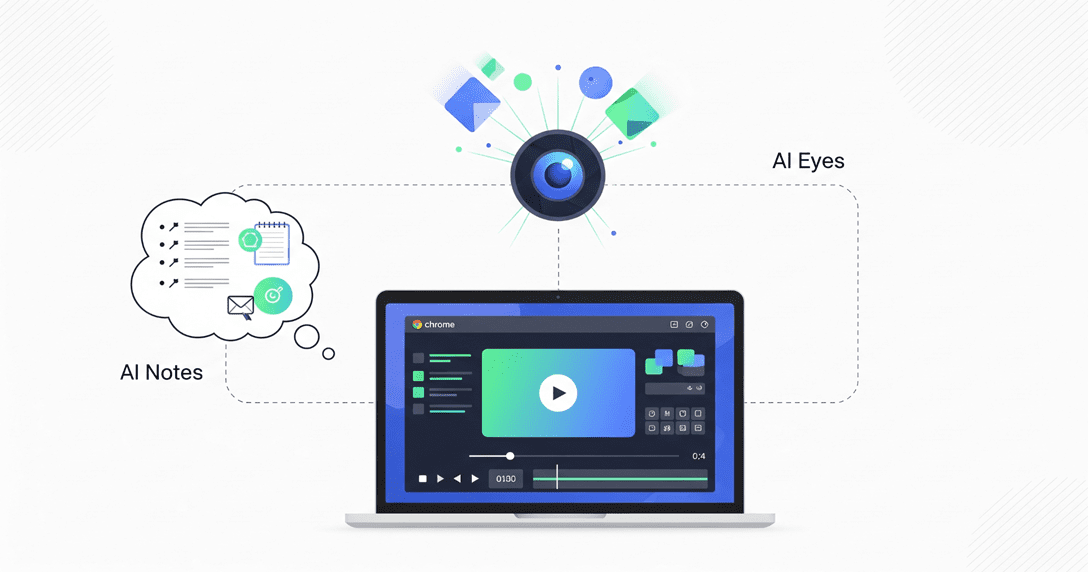
That’s exactly where ShotVu.com steps in. More than just a screen recorder, ShotVu is an AI-powered video productivity suite designed to make recording effortless while ensuring you look and sound your best. Its flagship feature — AI Eyes on Camera — changes the way people connect on video.
Why AI Eyes on Camera Matters

Eye contact is one of the most important elements of communication. It builds trust, holds attention, and makes your audience feel like you’re speaking directly to them. The problem? When recording, most people are looking at their notes, slides, or the screen — not the camera.
ShotVu’s AI Eyes on Camera solves this instantly. The tool automatically adjusts your gaze so it appears as if you’re looking directly into the camera, even when you’re glancing elsewhere. The result is a more natural, professional, and engaging video without any extra editing.
For teachers, business professionals, and content creators, this is a game-changer:
- Educators can present lessons with direct eye contact that keeps students engaged.
- Sales teams can record pitches that feel personal and trustworthy.
- Content creators can deliver tutorials and vlogs with studio-like polish.
All-in-One Features of ShotVu
While AI Eyes on Camera grabs the spotlight, ShotVu is much more than a single feature. It’s a complete recording toolkit built for productivity. Let’s break down its capabilities:
🎥 Screen + Webcam Recording
ShotVu lets you record your entire screen, a specific window, or a single tab — and pair it with your webcam feed. This combination is perfect for:
- Software tutorials
- Business presentations
- Online courses
- Video blogs
No downloads, no technical hurdles — just click record and go.
📝 AI Notes & Smart Summaries
Recording is only half the battle. ShotVu automatically processes your videos with AI to generate:
- Key highlights for quick review
- Meeting notes that summarize long sessions
- Action items so nothing gets lost
Instead of rewatching a 30-minute video, you (and your viewers) can skim the notes in seconds. This turns every recording into a productivity asset.
💬 Automatic Transcripts
Every ShotVu video includes a searchable transcript generated instantly after recording. This unlocks several benefits:
- Add captions to your YouTube videos for accessibility.
- Repurpose recordings into blog posts or documentation.
- Quickly find exact moments in a video without rewatching.
Transcripts aren’t just a convenience — they make your content easier to share, search, and scale.
📜 Built-In Teleprompter
Ever lost your flow mid-sentence while recording? With ShotVu’s integrated teleprompter, you can upload your script or talking points and display them right on screen. Combined with AI Eyes on Camera, this means you can read your script naturally while still maintaining eye contact.
This feature is perfect for:
- Pitches and investor presentations
- Online lectures
- YouTube videos with scripted narration
🌍 Instant Sharing & Collaboration
Once you finish recording, ShotVu makes sharing seamless:
- Send a simple link instead of bulky video files.
- Allow viewers to leave comments or reactions.
- Collaborate with teammates, clients, or students in real-time.
This makes ShotVu ideal for distributed teams, freelancers, and educators who want instant feedback.
🔒 Privacy & Security
Unlike many recording tools that bury your content in third-party servers, ShotVu emphasizes user control:
- Secure processing directly through your browser.
- You decide which recordings to save, share, or delete.
- No hidden storage policies — your content stays yours.
For professionals handling sensitive information, this level of control is critical.
💡 Simplicity That Scales
ShotVu is designed to be frictionless. It works in any modern browser, with no downloads or installations, allowing you to start recording instantly. Yet behind the simplicity lies powerful AI automation that scales with your needs — whether you’re recording a single tutorial or building an entire knowledge library.
How ShotVu Improves Productivity
ShotVu isn’t just about recording — it’s about working smarter. Here’s how it saves time and boosts efficiency:
- Cuts meeting fatigue – Record once, share everywhere, and let viewers watch on their own schedule.
- Reduces back-and-forth – Instead of endless emails, show exactly what you mean with a quick video.
- Creates reusable resources – Training videos, onboarding guides, and tutorials can be used repeatedly.
- Turns video into documentation – AI Notes and transcripts make every recording searchable and actionable.
For businesses, teachers, and creators, this means more clarity, less repetition, and faster results.
Who Should Use ShotVu?
ShotVu is versatile enough for almost anyone, but it shines especially for:
- Educators – Record lectures, lessons, and feedback with AI-enhanced presence.
- Teams & Businesses – Share updates, explain processes, and document workflows without scheduling extra meetings.
- Content Creators – Record tutorials, product reviews, or vlogs that look professional without expensive gear.
- Sales Professionals – Deliver personalized pitches that feel engaging and trustworthy.
Conclusion
Video is the future of communication — but recording shouldn’t be a struggle. ShotVu.com makes it simple to create professional, engaging videos powered by AI. With features like AI Eyes on Camera, AI Notes, transcripts, and a built-in teleprompter, ShotVu isn’t just a screen recorder — it’s a productivity tool that helps you look better, work faster, and connect more effectively.
👉 Ready to record smarter? Try ShotVu today and see how AI-powered recording can transform the way you work and create.
FAQ
Is ShotVu free to use?
Yes. ShotVu offers a free plan with access to screen recording, AI Eyes on Camera, and transcripts. Upgraded plans unlock more advanced features and longer recording times.
Do I need to install software?
No. ShotVu is completely browser-based — just log in and start recording.
Can I use ShotVu for team collaboration?
Absolutely. ShotVu allows instant sharing, comments, and reactions, making it perfect for team communication and remote work.
What makes ShotVu different from other screen recorders?
ShotVu combines traditional screen recording with AI-powered tools like AI Eyes on Camera, AI Notes, transcripts, and teleprompter — making your recordings more professional and productive.
Does ShotVu work for YouTube creators?
Yes. With built-in teleprompter, transcripts, and AI Eyes on Camera, ShotVu is perfect for producing polished YouTube content.