How Can Manageengine Pam360 Help Organizations Take The Path Towards Zero Standing Privileges?
- 1 Understanding Zero Standing Privileges
- 2 The Role of PAM360 in Achieving ZSP
- 2.1 1. Just-in-Time (JIT) Least Privilege Access
- 2.2 2. Role-Based Access Control (RBAC)
- 2.3 3. Session Monitoring and Auditing
- 2.4 4. Automated Credential Rotation
- 3 Benefits of Implementing ZSP with PAM360 to achieve ZSP
- 4 RoadblocksChallenges in Achieving ZSP
- 5 Conclusion
Find out how ManageEngine PAM360 can help your company achieve Zero Standing Privileges. Removing ongoing privileged access makes your system safer.
Zero Standing Privileges (ZSP) is a powerful idea in the world of cybersecurity these days. It lowers the risks that come with having constant privileged access. People with normal PAM (Privileged Access Management) solutions can always get into important systems. This makes it easier for hackers to get in. ZSP makes sure that privileged access is only allowed when it’s needed and taken away right after it’s been used. This is how ManageEngine’s PAM360 solves the problem.
Understanding Zero Standing Privileges
If you have zero standing privileges, you no longer have constant privileged access. People in a ZSP model only get more rights when they need them to do certain things. Access is automatically taken away when the job is done, so any abuse or threats can’t happen for long.
Cybercriminals often use lateral movement in networks, and this method works very well to stop it. By making sure that greater access is only temporary, organizations can greatly lower the risk of privilege abuse and threats from inside the company.
The Role of PAM360 in Achieving ZSP
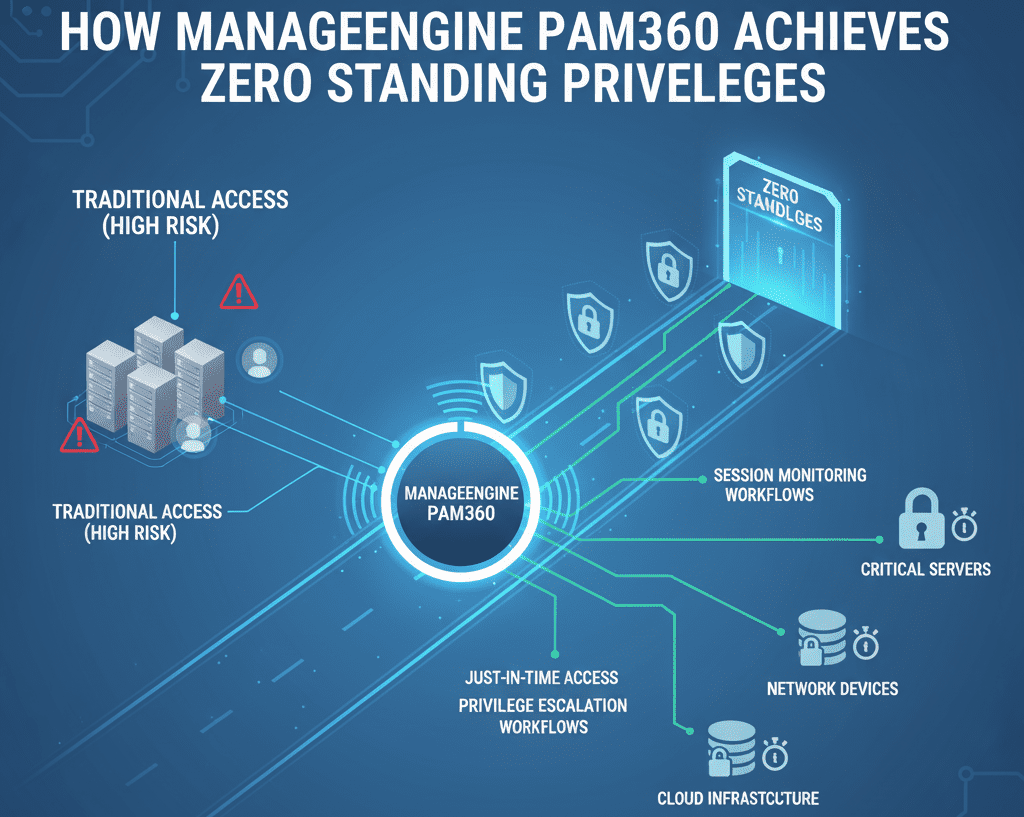
APAM360 – Enterprise privileged access management is a full PAM solution that makes it easier to put Zero Standing Privileges into place by having several important features:
1. Just-in-Time (JIT) Least Privilege Access
Powerful access is only allowed when requested and for a set amount of time in PAM360, thanks to its JIT access architecture. The ZSP posture is maintained by automatically revoking access once the job is completed. This way makes it less likely that someone will get in without permission and reduces the area that can be attacked.
2. Role-Based Access Control (RBAC)
RBAC is used by PAM360 to make sure that people only have the access they need for their jobs. Like the idea of “least privilege,” this ensures that users can only get the tools they need to do their work. By limiting access, you can lessen the damage that someone who gets into your account could do.
3. Session Monitoring and Auditing
Administrators can watch and record sessions live with this option, which also lets them watch privileged sessions. This feature makes it easy to observe activity that seems odd and saves a record of it for legal reasons. Organizations can monitor privileged meetings to ensure accountability and visibility of individuals.
4. Automated Credential Rotation
The PAM360 system changes protected credentials on its own, so passwords are always fresh and never stored or used again. This method aligns with the ZSP framework, reducing the likelihood of credential theft and improper use.
Explore PAM360’s end-to-end Zero Trust capabilities
Benefits of Implementing ZSP with PAM360 to achieve ZSP
There are several reasons to use PAM360 with a zero standing privileges model, such as:
- Less Surface to Attack: A lot fewer ways for attackers to get in are opened up when continuous privileged access is taken away.
- Session recordings and audits that are done automatically make it easier to follow rules like GDPR, HIPAA, and SOX.
- Operational Efficiency: Managing credentials and giving out access automatically simplifies routine tasks, which means IT staff have less work to do.
- Better Response to Incidents: Monitoring and alerts in real time let you find and deal with suspicious behavior quickly.
RoadblocksChallenges in Achieving ZSP
There are clear benefits to ZSP, but companies may have trouble putting it into practice:
- It might not be easy to use ZSP ideas with older systems that don’t support changeable access controls.
- Users who are used to having constant access may not want changes to the access rules. This means that they will need a lot of training and talking about the changes.
- Intensive on Resources: The company must keep giving resources and promise to keep the ZSP model going.
- Even with these issues, ZSP is still worth the work for businesses that want to improve their cybersecurity because it helps with both security and accountability.
Conclusion
Adding zero standing privileges to a company’s security goals plan is a smart way to keep valuable things safe. You can properly set up ZSP with ManageEngine PAM360’s many useful tools. JIT access, RBAC, session monitoring, and automatic identity management are some of the features that it supports. With PAM360’s ZSP features, companies can make their security better, make sure they’re following the rules, and lower the risk of authority abuse.
FAQs
What does it mean to have zero standing privileges (ZSP) as a security goal?
As a security measure, ZSP makes sure that no one has ongoing privileged access. Better rights are only given to them when they need them and taken away as soon as they are used.
How does PAM360 help ZSP?
PAM360 makes ZSP easier by letting you do things like automatically changing credentials, controlling access based on roles, keeping an eye on sessions, and granting access only when it’s needed.
Can I use ZSP in the cloud?
Yes, ZSP and PAM360 can work together in both cloud and on-premises settings. This makes sure that security rules are followed the same way in both.
What does ZSP do to help with compliance?
ZSP keeps track of reports, records sessions, and automatically manages credentials to help businesses follow rules like GDPR, HIPAA, and SOX.
Does ZSP make things hard to do?
There may be issues when trying to connect to old systems, when users don’t want to switch, or when it costs a lot to keep a ZSP model up and running.