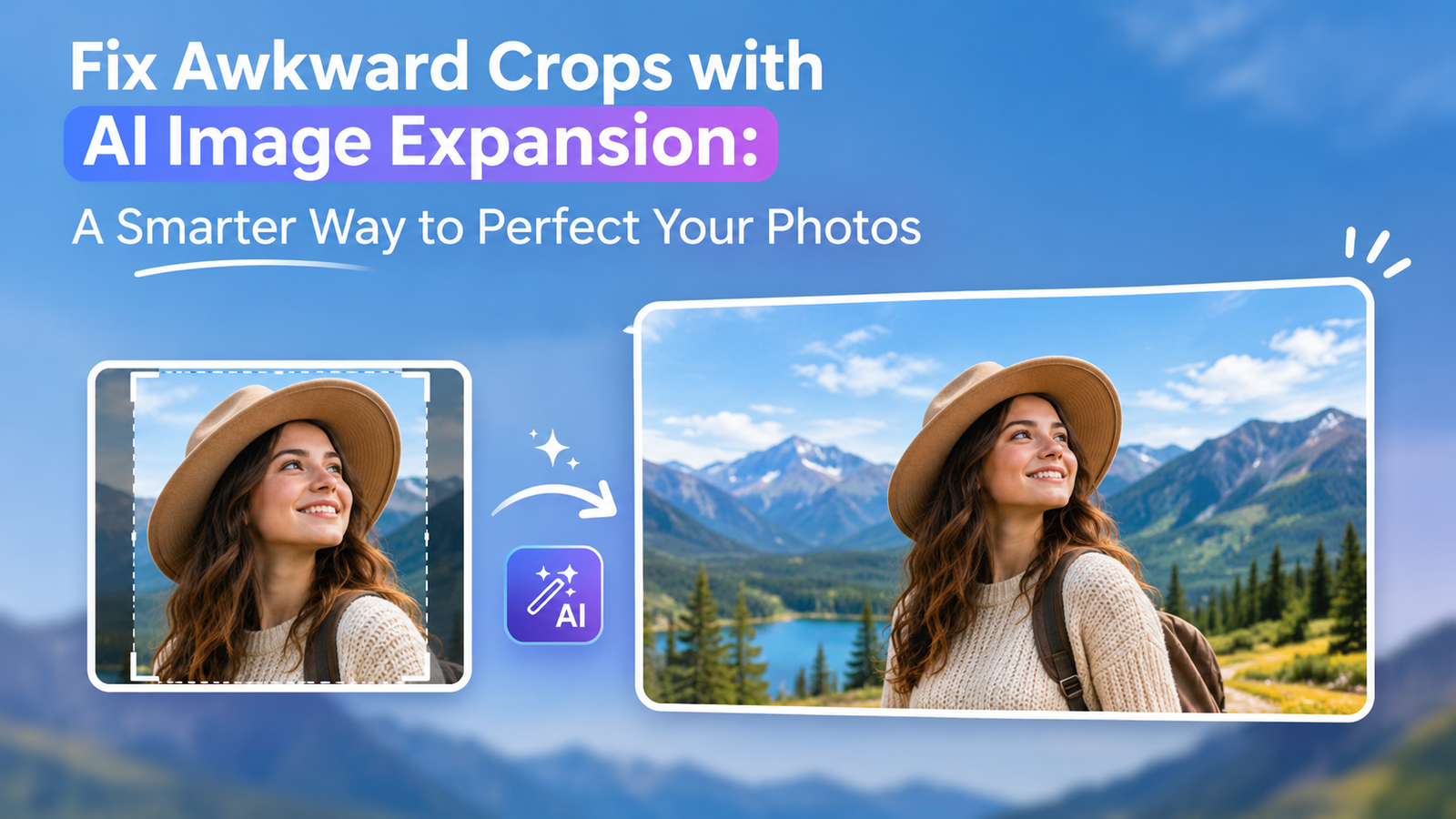
Fix Awkward Crops with AI Image Expansion: A Smarter Way to Perfect Your Photos
- 1 What Is AI Image Expansion?
- 2 Why Do Awkward Image Crops Happen?
- 3 How Image Expansion Works
- 3.1 Step 1: Choose Your Original Image
- 3.2 Step 2: Indicate Desired Expansion
- 3.3 Step 3: Let AI Do Its Thing
- 3.4 Step 4: Preview the Image
- 3.5 Step 5: Download and Use Your Image
- 4 The Best Cases for AI Image Expansion
- 4.1 Social Media Content
- 4.2 Website Banners and Headers
- 4.3 E-commerce Product Photography
- 4.4 Personal Photography
- 4.5 Graphic Design Projects
- 5 Preferred AI Image Expansion Tools
- 6 Getting Better Results
- 7 AI Image Expansion vs. Traditional Cropping
- 8 Common Editing Mistakes
- 9 Final Thoughts
A well-composed photograph can make a significant difference in how people perceive a website, advertisement, social media post, or promotional campaign. However, even an excellent photograph can become difficult to use when its dimensions do not match the requirements of a particular project. An important subject might appear too close to the border, the composition may feel unbalanced, or there simply may not be enough room for text and other design elements.
These problems are particularly common when the same photograph needs to be published across multiple platforms. An image that looks perfect in a portrait format might lose important details when converted into a wide landscape banner. Traditional editing methods often require designers to compromise by removing part of the original photograph or manually recreating missing background elements.
AI image expansion offers a more flexible solution. Rather than forcing an existing photograph into a different shape, this technology can generate additional visual content beyond its original boundaries. It examines the surrounding elements and produces new areas that complement the photograph’s existing appearance.
This makes it possible to improve composition, create additional background space, and prepare images for different layouts without unnecessarily sacrificing important visual details.
What Is AI Image Expansion?
AI image expansion is a photo-editing technique that uses generative artificial intelligence to increase the visible area of an existing photograph. It is also commonly known as generative outpainting because the technology creates new visual information outside the original image boundaries.
Unlike conventional resizing, which simply adjusts an image’s dimensions, AI expansion generates additional content. The software examines the photograph to understand its visual characteristics, including its colors, lighting conditions, textures, surroundings, and overall composition. It then uses this information to produce new sections that appear connected to the original scene.
For example, imagine taking a portrait photograph against a beautiful outdoor background. The subject may look excellent, but the image might not have enough space around the person for a particular design layout. AI expansion can generate additional scenery around the subject, making the composition more spacious without changing the original person’s appearance.
This technology offers several practical advantages. It can introduce additional space around people, products, and other important subjects. It can also extend backgrounds, create room for headlines and promotional messages, and adapt photographs to different aspect ratios.
Another useful application is improving older photographs that were originally captured with limited framing. Instead of discarding an otherwise valuable picture, users can generate additional surrounding content to make it suitable for modern digital displays.
The most important distinction is that AI expansion creates new image information rather than stretching existing pixels or simply increasing resolution.
Why Do Awkward Image Crops Happen?
Poor cropping is not always the result of an inexperienced photographer. In many situations, the original photograph may be perfectly composed for its intended purpose, but problems appear when someone tries to reuse it in a different format.
Digital platforms have different image specifications, and designers frequently need to modify the same visual asset for websites, advertisements, presentations, and social media channels. Maintaining the original composition across all these formats can be challenging.
One common problem occurs when the main subject is positioned very close to an image boundary. A photograph with limited surrounding space can become difficult to adapt when a wider or taller layout is required.
Another issue involves backgrounds that lack sufficient negative space. Marketing graphics often require room for headings, product information, logos, and calls to action. When the original photograph does not provide that space, designers may struggle to arrange everything without making the composition look crowded.
Poor Composition in Older Photos
Photographs taken several years ago may not have been captured with today’s digital publishing requirements in mind. Older cameras, limited storage capacities, and different photography habits often resulted in tightly framed pictures.
These images can still have considerable visual value, but their original dimensions may limit where they can be used. AI image expansion provides an opportunity to improve their framing by creating additional surroundings while retaining the recognizable elements of the original photograph.
How Image Expansion Works
AI Image Expansion can create new images while keeping things consistent. Tools that let users try AI expand image features make it easier to extend existing visuals beyond their original borders.
Modern editing platforms have made this functionality accessible to people who do not have professional photography or graphic design experience. Users can generally upload a photograph, select the required dimensions, and allow the software to generate the missing areas.
Here is how the process typically works.
Step 1: Choose Your Original Image
Begin by selecting the photograph that needs additional space. It could be a product picture, portrait, landscape photograph, promotional graphic, or another visual asset.
Image quality plays an important role in the final outcome. Clear photographs with recognizable subjects and reasonably detailed backgrounds usually provide better information for the AI model to analyze.
Although expansion technology can work with different types of images, starting with a clean original generally makes the editing process easier.
Step 2: Indicate Desired Expansion
After uploading the photograph, decide how much additional space the composition requires.
Depending on the editing platform, you may be able to extend the image toward the left, right, top, or bottom. Some applications also provide predefined aspect ratios, allowing you to prepare the photograph for a specific publishing destination.
For example, a square product photograph might need additional horizontal space to fit a website banner. In that situation, expanding the left and right boundaries would be more appropriate than changing the entire composition.
Step 3: Let AI Do Its Thing
Once the desired expansion area has been selected, the generative system begins examining the original photograph.
It identifies visual patterns, lighting, colors, and nearby objects before generating additional content. The newly created sections are intended to blend naturally with the existing image, creating the impression that the photograph was originally captured with a wider frame.
Some tools also support text prompts, which allow users to describe the type of background or additional elements they want.
Step 4: Preview the Image
Never assume that the first generated result will be perfect. AI-generated sections can occasionally contain unexpected objects, inconsistent textures, or details that do not match the original scene.
Examine the boundaries between the original photograph and the expanded portions. Pay particular attention to faces, hands, architectural structures, repeated patterns, and objects that continue across the image.
If something looks unnatural, try generating another variation or adjusting the expansion area. Reviewing multiple results can help you identify the version that fits the original composition best.
Step 5: Download and Use Your Image
Once you are satisfied with the result, export the finished photograph in an appropriate file format and resolution.
Consider where the image will be published before choosing the export settings. Website graphics, social media photographs, printed advertisements, and e-commerce images may have different requirements.
A properly expanded image can now be incorporated into your website, promotional campaign, online store, presentation, or other creative project.
The Best Cases for AI Image Expansion
AI image expansion is useful for much more than correcting photographs with poor framing. It gives designers, marketers, photographers, and everyday users greater control over how visual content fits into different environments.
Social Media Content
Social media platforms support different image layouts, and content creators often need to prepare several versions of the same photograph. A picture designed for a square post may not work equally well in a vertical story or a landscape promotional graphic.
Instead of repeatedly cropping the original photograph, creators can use AI expansion to generate additional surrounding space. This helps preserve the main subject while adapting the composition to the required dimensions.
It is particularly useful for maintaining consistency when publishing the same campaign across multiple social media platforms.
Website Banners and Headers
Website headers frequently require wide images, whereas many photographs are originally captured in portrait or square formats. Enlarging these photographs through conventional methods can distort their appearance or reduce their visual quality.
AI expansion can generate additional background areas to accommodate wider layouts. This gives website designers more flexibility when preparing hero sections, promotional banners, landing pages, and other large visual elements.
The additional space can also make it easier to position navigation elements, headlines, and other interface components.
E-commerce Product Photography
Product photographs need to communicate important details clearly while fitting into different store layouts. However, an image that works for a product listing may not provide enough surrounding space for promotional information or advertising elements.
Generative expansion can help create additional background space around the product. This is useful when preparing promotional graphics, category banners, and marketing materials.
For commercial applications, it is important to preserve the actual appearance of the product. Generated content should complement the photograph rather than alter important product characteristics.
Personal Photography
Personal photographs are another area where AI expansion can be valuable. Family pictures, vacation photographs, portraits, and memorable moments are not always captured with ideal framing.
Sometimes a person’s face appears too close to the edge, or an attractive background is partially missing because of the original camera framing.
AI expansion can help improve these compositions by generating additional surroundings. This allows people to reuse their favorite photographs in different formats without removing important parts of the original image.
Graphic Design Projects
Graphic designers frequently need empty areas within photographs to accommodate typography, branding, logos, and promotional messages.
Finding an image that provides the perfect balance between the main subject and available background space can take considerable time.
AI expansion offers another approach by creating additional negative space around the subject. Designers can then arrange text and other visual elements without making the original photograph appear unnecessarily crowded.
This flexibility can be especially valuable when creating advertisements, presentation slides, website graphics, and branded marketing materials.
Preferred AI Image Expansion Tools
Several image-editing platforms now include generative features that make expanding photographs considerably easier. The available functionality, editing controls, and export options vary between applications, so choosing the right platform depends on the type of work you regularly perform.
Generative Expand
Adobe Photoshop includes a Generative Expand feature that allows users to extend photographs beyond their existing boundaries. It uses generative AI to create additional visual content that complements the original image.
The feature is particularly useful for photographers, professional designers, and creative teams who already use Photoshop as part of their editing workflow.
Users can adjust the canvas dimensions and generate additional content around the photograph. Depending on the selected workflow, text prompts can also help guide the generated result.
Canva Magic Expand
Canva provides AI-powered editing features that simplify common graphic design tasks. Its Magic Expand functionality is designed to extend images beyond their original dimensions, making it easier to adapt existing photographs to different layouts.
This can be especially convenient for social media managers, content creators, and small businesses that use Canva to prepare marketing materials.
Because the platform combines image editing with graphic design tools, users can continue working on their layouts after expanding a photograph.
AI Image Expansion Tools
Apart from established design platforms, several specialized applications concentrate on AI-powered image expansion. These services are often designed around a straightforward process in which users upload an image, choose the required expansion dimensions, and generate an extended version.
Some platforms also include additional editing options, such as background generation, image enhancement, and other generative editing capabilities.
When comparing these applications, consider the quality of generated details, available aspect ratios, prompt customization, processing speed, and export resolution. It is also worth checking whether the platform provides sufficient control over the generated areas.
A tool that produces attractive results but offers limited editing flexibility may not be suitable for professional projects requiring precise compositions.
Getting Better Results
Although AI technology can produce impressive results, the quality of the final photograph depends on several factors. Choosing suitable source images and reviewing generated content carefully can make a noticeable difference.
Start with a good quality image: High-resolution photographs generally provide more useful visual information for generative models. Clear subjects, balanced lighting, and recognizable backgrounds can help the software produce more consistent extensions.
Expand in stages: Avoid generating a very large extension in a single attempt when only a small amount of additional space is needed. Gradual adjustments make it easier to maintain continuity and identify problems before they affect larger portions of the composition.
Match lighting: Pay attention to the direction of light, shadow placement, reflections, and overall brightness. Newly generated areas should follow the same lighting conditions as the original photograph. Otherwise, the expanded sections may look as though they belong to a different scene.
Use descriptive prompts: If your chosen application supports text instructions, provide a clear description of the surroundings you want. Mention relevant details such as background textures, environmental elements, colors, and lighting conditions. Specific instructions can help guide the generation process toward a more suitable result.
Look for inconsistencies: Examine the expanded photograph at a closer zoom level before exporting it. Unnatural object shapes, distorted hands, inconsistent facial details, duplicated patterns, and poorly connected edges can reduce the overall quality.
Save original: Always retain an untouched copy of the source photograph. This allows you to compare different generated versions, repeat the editing process, and recover the original composition whenever necessary.
AI Image Expansion vs. Traditional Cropping
Traditional cropping and AI image expansion are both useful photography techniques, but they solve different composition problems.
Cropping works by removing selected portions of an existing photograph. It is useful when you want to eliminate distractions, emphasize a particular subject, or create a cleaner visual arrangement.
AI expansion takes the opposite approach. Rather than removing existing image content, it generates additional areas outside the original boundaries.
Consider a landscape photograph that needs to be converted into a wide website banner. Cropping might remove important scenery from the sides or force the designer to sacrifice part of the main subject. This could significantly change the original composition.
With AI expansion, the existing photograph can remain largely intact while additional scenery is generated around its borders. The resulting image may provide enough horizontal space for the banner without losing the original subject.
There is an important distinction between the two methods. Cropping is primarily about removing unnecessary visual information, whereas expansion is intended to introduce additional space and content.
Neither approach is universally better. The appropriate choice depends on the original photograph, the intended composition, and the requirements of the final design.
Common Editing Mistakes
AI-powered editing can simplify many photography tasks, but it does not eliminate the need for careful visual judgment. Generative systems sometimes produce results that look convincing at first glance but contain noticeable problems when examined more closely.
One frequent mistake is expanding an image beyond what its original composition can reasonably support. Generating large areas of additional content can introduce inconsistent backgrounds, unusual textures, and unrelated objects. Keeping the expansion proportional to the original photograph generally produces more natural results.
Another issue involves accepting generated details without inspecting them. AI systems can occasionally create distorted architectural lines, incorrectly connected objects, inconsistent patterns, or background elements that do not make sense within the scene.
Ignoring the final display dimensions is also a common problem. An image may look balanced inside an editing application but appear poorly composed after being placed into a website header, social media post, or advertising layout.
Users should also avoid relying entirely on automated generation when editing commercially important photographs. Product images, branded materials, and professional portraits may require additional manual adjustments to ensure accuracy.
The best approach is to treat AI expansion as an editing assistant rather than a replacement for creative judgment. Reviewing the finished image and making necessary corrections will help ensure that the final result meets the intended visual standards.
Final Thoughts
AI image expansion has introduced a practical way to overcome one of the most common challenges in photography and graphic design: limited image framing. Instead of removing important details or manually recreating missing backgrounds, users can generate additional visual content that complements the original photograph.
Its applications extend across several areas, including social media publishing, website design, e-commerce photography, personal image editing, and professional marketing campaigns. The ability to adjust compositions without unnecessarily sacrificing existing content makes this technology particularly useful for projects involving multiple image dimensions.
However, successful results still depend on choosing appropriate source photographs, selecting sensible expansion areas, and reviewing the generated details. Not every AI-generated result will look completely natural, and some images may require additional editing.
By combining generative technology with careful visual evaluation, photographers and designers can make their existing image collections more versatile. AI expansion does not simply provide a way to fix awkward crops; it creates new opportunities to adapt photographs to creative requirements while preserving the visual elements that make them worth using in the first place.